
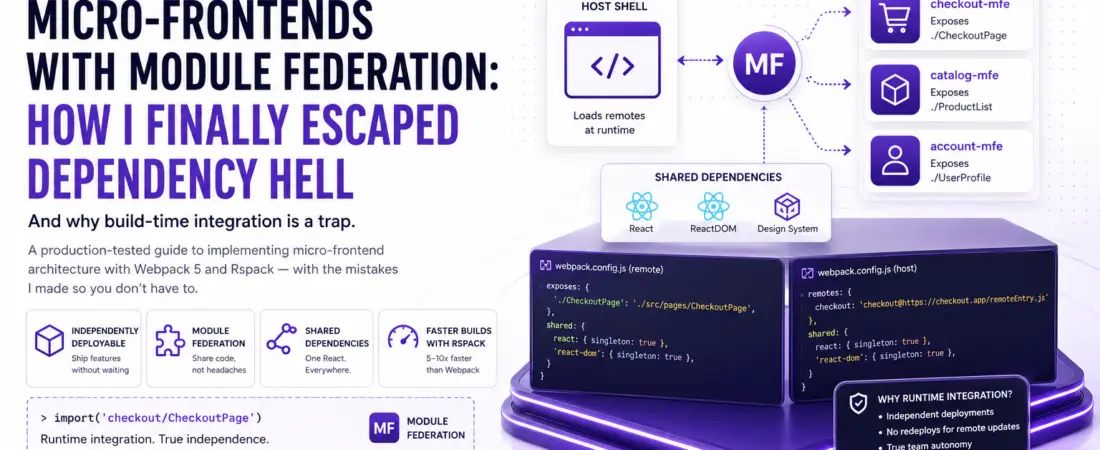
The honest, production-tested guide to implementing micro-frontend architecture with Webpack 5 and Rspack — including the mistakes I made so you don’t have to.
The Monolith That Almost Broke My Team
Picture this: a 400,000-line React monolith shared by six product teams across three time zones. Every dependency upgrade becomes a negotiation. A react-dom version bump in one team’s component tree breaks another team’s integration tests. Deployments require a full regression cycle because nobody’s sure which shared package changed what. Every Friday release is a group therapy session disguised as a standup.
I’ve lived this. And the way out wasn’t a rewrite — it was Micro-Frontend architecture backed by Webpack 5 Module Federation.
But let me be upfront: micro-frontends are not a silver bullet. I’ve seen teams adopt them prematurely, over-engineer the federation layer, and end up with a distributed monolith that’s harder to maintain than what they started with. This guide is about doing it right — understanding the trade-offs, choosing the correct integration strategy, and implementing with Webpack 5 (and its faster successor, Rspack) in a way that scales.
What Are Micro-Frontends, Really?
The term “micro-frontend” gets thrown around loosely. Here’s the precise definition I work from: micro-frontends extend microservice principles to the frontend — independently deliverable, autonomously owned frontend modules that compose into a coherent user experience.
Key word: independently deployable. If you can’t ship one micro-frontend without coordinating with another team, you don’t have micro-frontends. You have a distributed monolith with extra deployment steps.
The Decomposition Strategies
Before reaching for Module Federation, it’s worth being clear about how you’re slicing the frontend. There are three dominant patterns:
- Vertical slicing by domain — Each team owns an entire feature domain: routing, components, API calls, and state. This is my default recommendation. Example: Checkout Team, Product Discovery Team, Account Team.
- Horizontal slicing by layer — Teams own layers (header team, footer team, page-shell team). This creates coupling at the integration seam and is generally a smell.
- Hybrid — Vertical domains with shared horizontal infrastructure (design system, auth, analytics). This is what most mature platforms land on.
Runtime Integration vs. Build-Time Integration: This Choice Defines Everything
This is the most important architectural decision in any micro-frontend project, and it’s the one I see teams get wrong most often.
Build-Time Integration (Why It’s Usually a Trap)
Build-time integration means your shell application imports micro-frontends as npm packages. They’re installed via package.json, versioned, and bundled together at compile time.
// package.json of the host app — build-time integration
{
  "dependencies": {
    "@company/checkout-mfe": "^2.1.0",
    "@company/catalog-mfe": "^1.8.3"
  }
}
Why this feels good: It’s familiar. Type safety across boundaries. No runtime surprises.
Why it’s usually a trap:
- You’ve reintroduced deployment coupling. Shipping a new version of
@company/checkout-mferequires rebuilding and redeploying the host app. - Dependency conflicts resurface. Each package brings its own transitive dependencies.
- You’ve just built a distributed monolith.
The only scenario where I recommend build-time integration is for tightly coupled subsystems where independent deployment genuinely adds no value — and at that point, I’d question whether they should be separate micro-frontends at all.
Runtime Integration: The Actual Solution
Runtime integration means the host application fetches and executes remote modules at runtime, without knowing their implementation at build time. The canonical implementation today is Webpack 5 Module Federation.
There are three flavors of runtime integration:
| Strategy | Description | Best For |
|---|---|---|
| Module Federation | JavaScript module sharing via manifest | Teams using Webpack/Rspack, React/Vue/Angular |
| Web Components | Custom elements via native browser APIs | Framework-agnostic, legacy coexistence |
| iframes | Hard isolation via browser context | Compliance-heavy apps, true isolation required |
| Client-side composition | JavaScript-loaded bundles at runtime | Simple use cases without complex sharing |
Module Federation covers 80% of real-world cases. Let’s build it.
Webpack 5 Module Federation: How It Actually Works
Before writing config, let me explain the mental model. Module Federation introduces three concepts:
- Host (Consumer) — The application that loads remote modules at runtime.
- Remote (Producer) — An independently deployed application that exposes modules.
- Shared modules — Libraries like React that should be loaded once, not duplicated across remotes.
The federation plugin generates a remoteEntry.js manifest at build time. When the host encounters a federated import, it fetches the remote’s remoteEntry.js, resolves the shared dependency graph, and loads the actual module chunk — all at runtime, in the browser.
Host App                     Remote: Checkout MFE
   |                               |
   |-- loads remoteEntry.js ------>|
   |<-- receives module manifest --|
   |-- checks shared deps (React) -|
   |<-- serves shared chunk -------|
   |-- renders <CheckoutPage /> ---|
Practical Implementation: Webpack 5 Module Federation
Let’s build a real example: a host shell application that loads a CheckoutPage from a remote checkout-mfe.
Step 1: Configure the Remote (checkout-mfe)
// checkout-mfe/webpack.config.js
const { ModuleFederationPlugin } = require('webpack').container;
const deps = require('./package.json').dependencies;

module.exports = {
  mode: 'production',
  entry: './src/index',
  output: {
    publicPath: 'auto', // Critical: lets Webpack infer the public URL at runtime
    filename: '[name].[contenthash].js',
    clean: true,
  },
  plugins: [
    new ModuleFederationPlugin({
      name: 'checkout',                      // Global variable name on window
      filename: 'remoteEntry.js',            // Manifest file name — keep this stable
      exposes: {
        // Key: the import path consumers will use
        // Value: the actual file path within this app
        './CheckoutPage': './src/pages/CheckoutPage',
        './CartWidget': './src/components/CartWidget',
      },
      shared: {
        react: {
          singleton: true,               // Only ONE instance of React allowed
          requiredVersion: deps.react,   // Enforce semver compatibility
          eager: false,                  // Don't include in initial chunk
        },
        'react-dom': {
          singleton: true,
          requiredVersion: deps['react-dom'],
          eager: false,
        },
        // Share your design system to avoid duplicate bundle weight
        '@company/design-system': {
          singleton: true,
          requiredVersion: deps['@company/design-system'],
        },
      },
    }),
  ],
};
Step 2: Configure the Host (shell-app)
// shell-app/webpack.config.js
const { ModuleFederationPlugin } = require('webpack').container;
const deps = require('./package.json').dependencies;

module.exports = {
  mode: 'production',
  entry: './src/bootstrap',  // Note: NOT ./src/index — see bootstrap pattern below
  output: {
    publicPath: 'auto',
  },
  plugins: [
    new ModuleFederationPlugin({
      name: 'shell',
      remotes: {
        // Key: the alias used in import statements
        // Value: globalName@URL/remoteEntry.js
        checkout: 'checkout@https://checkout.myapp.com/remoteEntry.js',
        catalog: 'catalog@https://catalog.myapp.com/remoteEntry.js',
      },
      shared: {
        react: { singleton: true, requiredVersion: deps.react },
        'react-dom': { singleton: true, requiredVersion: deps['react-dom'] },
        '@company/design-system': {
          singleton: true,
          requiredVersion: deps['@company/design-system'],
        },
      },
    }),
  ],
};
Step 3: The Bootstrap Pattern (This Is Not Optional)
This is the single most common mistake I see with Module Federation implementations. If you don’t use the bootstrap pattern, you’ll hit an error about eager consumption of shared modules.
// src/index.js — only ONE line, no imports
import('./bootstrap');

// src/bootstrap.js — all your actual app initialization
import React from 'react';
import ReactDOM from 'react-dom/client';
import App from './App';

const root = ReactDOM.createRoot(document.getElementById('root'));
root.render(<App />);
The bootstrap file allows Webpack to asynchronously negotiate shared dependencies before executing application code. Without this indirection, your top-level import React from 'react' is evaluated synchronously before Module Federation can check if a compatible version is already loaded by another remote.
Step 4: Consuming a Remote Module in the Host
// src/App.jsx — in the host shell app
import React, { Suspense, lazy } from 'react';
import { BrowserRouter, Route, Routes } from 'react-router-dom';

// Federated import — this looks like a normal dynamic import
// 'checkout' matches the key in remotes config
// '/CheckoutPage' matches the key in exposes config
const CheckoutPage = lazy(() => import('checkout/CheckoutPage'));
const CartWidget = lazy(() => import('checkout/CartWidget'));

export default function App() {
  return (
    <BrowserRouter>
      <header>
        <Suspense fallback={<div>Loading cart...</div>}>
          <CartWidget />
        </Suspense>
      </header>
      <Routes>
        <Route
          path="/checkout"
          element={
            <Suspense fallback={<div>Loading checkout...</div>}>
              <CheckoutPage />
            </Suspense>
          }
        />
      </Routes>
    </BrowserRouter>
  );
}
Pro Tip: Always wrap federated components in <Suspense> with meaningful fallbacks. The remote’s bundle is fetched over the network at runtime — network failures happen. Pair this with an error boundary to gracefully degrade when a remote is unavailable.
// ErrorBoundary for graceful MFE degradation
class RemoteErrorBoundary extends React.Component {
  state = { hasError: false };

  static getDerivedStateFromError() {
    return { hasError: true };
  }

  componentDidCatch(error, info) {
    // Log to your observability platform
    console.error('Remote MFE failed to load:', error, info);
  }

  render() {
    if (this.state.hasError) {
      return this.props.fallback || <div>This feature is temporarily unavailable.</div>;
    }
    return this.props.children;
  }
}

// Usage
<RemoteErrorBoundary fallback={<div>Checkout unavailable, try again later.</div>}>
  <Suspense fallback={<Spinner />}>
    <CheckoutPage />
  </Suspense>
</RemoteErrorBoundary>
Solving Dependency Hell: The Shared Module Contract
Dependency conflicts are the #1 operational pain point with micro-frontends. Here’s my mental model for thinking about it.
The Three Sharing Modes
// Mode 1: Singleton — only one version allowed across all remotes
// Use for: React, React-DOM, global state managers, your design system
react: {
  singleton: true,
  requiredVersion: '^18.0.0',
  strictVersion: false,  // Warn but don't fail on version mismatch
}

// Mode 2: Shared but not singleton — each remote can use its own version,
// but they'll reuse an already-loaded compatible version if available
// Use for: utility libraries (lodash, date-fns, axios)
'date-fns': {
  singleton: false,
  requiredVersion: '^3.0.0',
}

// Mode 3: Not shared — always bundle privately
// Use for: libraries with internal state that must not be shared,
// or libraries where version mismatches are critical
// Just omit from shared config entirely
Handling Version Mismatches Gracefully
When singleton: true is set and two remotes declare incompatible required versions, Module Federation will load the higher version and emit a console warning. This is usually fine — React 18.2.0 is backwards compatible with 18.0.0 consumers.
Where it breaks: if the host declares react: "^17.0.0" and a remote declares react: "^18.0.0". These are semver-incompatible. Module Federation will load React 18 (the higher version) and your React 17 component tree will break. The solution is to keep your major versions aligned across all remotes and enforce it in CI.
// In your monorepo root package.json or a shared config
// Use a script that checks all MFE package.jsons for consistent React versions
{
  "scripts": {
    "check:deps": "node scripts/check-shared-dep-versions.js"
  }
}
Migrating to Rspack: The 10x Faster Alternative
Rspack is a Rust-based Webpack-compatible bundler from ByteDance. It’s API-compatible with Webpack 5, supports Module Federation natively, and in my experience delivers 5–10x faster build times for large MFE codebases.
The migration is simpler than you’d expect if you’re already on Webpack 5:
// rspack.config.js — almost identical to webpack.config.js
const { ModuleFederationPlugin } = require('@rspack/core');

module.exports = {
  entry: './src/index',
  output: {
    publicPath: 'auto',
  },
  plugins: [
    new ModuleFederationPlugin({
      // Same config as Webpack 5 — API-compatible
      name: 'checkout',
      filename: 'remoteEntry.js',
      exposes: {
        './CheckoutPage': './src/pages/CheckoutPage',
      },
      shared: {
        react: { singleton: true, requiredVersion: '^18.0.0' },
        'react-dom': { singleton: true, requiredVersion: '^18.0.0' },
      },
    }),
  ],
  // Most Webpack 5 loaders work; check rspack.dev/guide/compatibility
  module: {
    rules: [
      {
        test: /\.[jt]sx?$/,
        use: [{ loader: 'builtin:swc-loader' }], // Use Rspack's built-in SWC loader
      },
    ],
  },
};
Migration checklist:
- Replace
webpackwith@rspack/coreand@rspack/cli - Replace
babel-loaderwithbuiltin:swc-loader(optional but recommended for max speed) - Audit custom webpack plugins — most work, but verify against Rspack’s compatibility list
- Remove
HtmlWebpackPlugin— Rspack has a built-inHtmlRspackPlugin
Lessons Learned: The Hard-Won Insights
- The contract between host and remote is your most important interface. Treat it like an API contract. Expose stable, well-typed interfaces. If you’re using TypeScript, use
@module-federation/typescriptto share type definitions across remotes. - Independent deployability requires independent CI/CD. If all your MFEs deploy together, you’ve lost the primary benefit. Each remote should have its own pipeline that deploys to its own CDN path.
- Runtime URL configuration is essential. Never hardcode remote URLs in your Webpack config. Use dynamic remotes so you can point to different versions (staging vs. production) without rebuilding:
// Dynamic remote URL resolution
new ModuleFederationPlugin({
  remotes: {
    checkout: `promise new Promise(resolve => {
      const url = window.__MFE_CONFIG__?.checkout || 'https://checkout.myapp.com/remoteEntry.js';
      const script = document.createElement('script');
      script.src = url;
      script.onload = () => {
        const proxy = { get: (request) => window.checkout.get(request), init: (arg) => { try { return window.checkout.init(arg) } catch(e) {} } };
        resolve(proxy);
      };
      document.head.appendChild(script);
    })`,
  },
})
- Shared state across MFEs is a design smell. If two MFEs need to share runtime state, it usually means they belong to the same domain. Use an event bus (Custom Events,
rxjs, or a published state library like Zustand with a shared instance) sparingly and document the contract explicitly. - Performance budgets matter more with MFEs. Each remote adds a network request. Measure Core Web Vitals per route, not just globally.
Common Pitfalls to Avoid
- Not wrapping remotes in error boundaries — A remote failing to load should never crash the entire shell application. Always use
<Suspense>+ error boundaries. - Sharing too many dependencies — Not everything needs to be shared. Over-sharing increases the complexity of the shared module negotiation and makes version mismatches more likely. Be selective.
- CSS global scope collisions — Each remote’s stylesheets are injected globally. Use CSS Modules, CSS-in-JS, or scoped selectors (BEM with a team-specific prefix) to avoid collisions.
- Forgetting
publicPath: 'auto'— Without this, your remote’s chunk URLs will be wrong when loaded from a different origin than where they were built. - Ignoring the development experience — Running 6 separate Webpack dev servers is painful. Use a
docker-compose.ymlor a monorepo tool (Nx, Turborepo) to orchestrate local development. Nx has first-class Module Federation support.
Pro Tips for Senior Engineers
- Use
@module-federation/enhanced— This is the official “next-gen” Module Federation runtime that supports server-side rendering (SSR), React Server Components compatibility, and improved error handling. It’s the direction the ecosystem is heading. - Implement a Module Federation manifest — Rather than hardcoding remote URLs, serve a central manifest JSON that maps remote names to their current
remoteEntry.jsURLs. Update the manifest to release new versions without redeploying the host. - Set up a dedicated integration environment — Local development mocks remotes. CI tests them in isolation. But you need an environment that composes real remotes end-to-end before production. Treat it like your integration test suite.
- Monitor your shared module loading in production — Use performance marks to track how long remote loading takes. A remote that consistently takes 800ms to load is degrading your LCP on every page that includes it.
Conclusion
Micro-frontends with Module Federation are one of the most powerful architectural patterns available to frontend teams dealing with organizational scale — but only if you implement them with the right intentions. The goal isn’t technical elegance; it’s organizational autonomy. Independent deployment, independent ownership, independent decision-making.
The build-time vs. runtime integration decision is the one that defines whether you actually achieve that autonomy. Runtime integration via Module Federation is harder to set up but delivers the independence that justifies the architectural complexity in the first place.
Start with two remotes, not ten. Nail the shared dependency contract. Invest in the development experience. And measure the impact — both on team velocity and on user-facing performance — so you can make the case (or the retreat) with data.
Have you shipped micro-frontends at scale? I’d love to compare notes — especially if you’ve tackled SSR with Module Federation. Find me in the comments or on X.
Tags: Micro-Frontends, Module Federation, Webpack 5, Rspack, Frontend Architecture, React, Dependency Management, Monorepo, JavaScript, Web Performance