
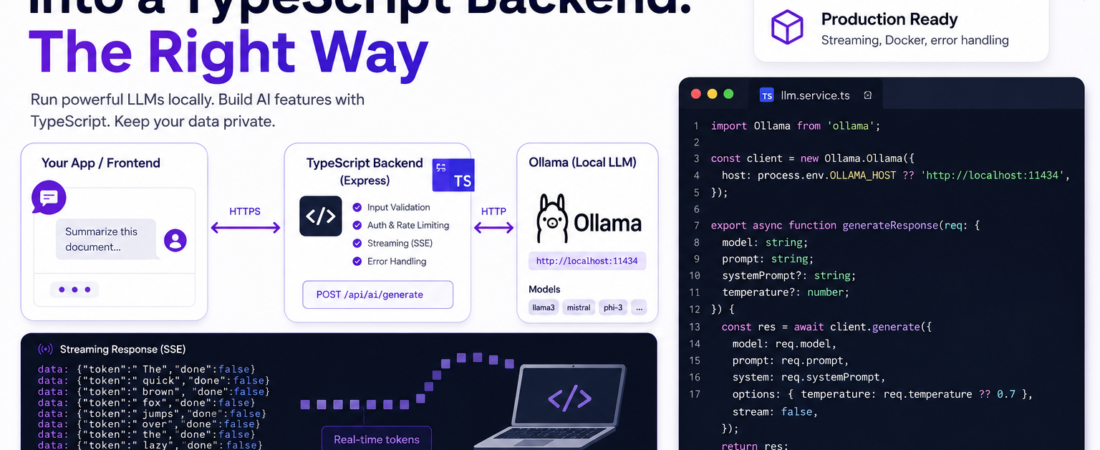
Meta description: Veja como integrei um LLM local com Ollama em um backend TypeScript — streaming, Docker e error handling prontos para produção, sem nenhuma API key.
Last updated: May 27, 2025
The first time I ran a language model entirely on my own hardware and called it from a TypeScript API, I felt like I’d unlocked a superpower. No OpenAI bill, no data leaving my network, no rate limits. I was building an internal document-summarization tool for a client with strict data residency requirements, and integrating a local Ollama LLM into a TypeScript backend was the only viable path. It wasn’t plug-and-play — I hit CORS issues, streaming serialization bugs, and a model that silently returned empty strings under load. This guide documents exactly what I did, including the parts that broke.
TL;DR
- Ollama exposes a local REST API on
localhost:11434— you can call it from any TypeScript/Node.js backend with a plainfetchor the officialollamanpm package. - Streaming responses require reading
ReadableStreamchunks and parsing newline-delimited JSON — not a standard SSE format. - For production-like deployments, wrap Ollama in a Docker container and expose it behind your existing API gateway for auth and rate limiting.
Why Integrating a Local Ollama LLM Into TypeScript Backends Matters
Local LLM integration is becoming a first-class concern for teams building internal tools, healthcare apps, legal tech, or anything with GDPR/HIPAA constraints. Sending prompts to a third-party API means your data — even temporarily — transits someone else’s infrastructure.
Ollama solves this by packaging models (Llama 3, Mistral, Phi-3, Gemma, and dozens more) with a runtime that runs entirely on your machine or on-prem server. When you pair it with a TypeScript backend, you get type-safe, maintainable AI features without sacrificing data sovereignty.
Security Note: Even on a local network, always put an authentication layer between your frontend and your Ollama-powered API endpoint. Ollama itself has no built-in auth — anyone on the same network can call it directly if you expose port
11434.
Prerequisites
- Ollama installed and running (
v0.1.38or later — earlier versions have a streaming bug I’ll cover below) - Node.js
20+ - TypeScript
5.x - At least one model pulled:
ollama pull llama3orollama pull mistral - A basic Express or Fastify project (I’ll use Express in examples)
tsxorts-nodefor running TypeScript directly during development
Step-by-Step: How to Integrate Ollama LLM Into a TypeScript Backend
Step 1 — Install and Verify Ollama
# macOS
brew install ollama

# Linux
curl -fsSL https://ollama.com/install.sh | sh

# Pull a model (I use llama3 for most tasks)
ollama pull llama3

# Verify the API is running
curl http://localhost:11434/api/tags
The /api/tags endpoint returns a JSON list of locally available models. If you see {"models":[...]} you’re good. If you get connection refused, start the daemon with ollama serve.
Step 2 — Install the TypeScript Ollama Client
The official ollama npm package wraps the REST API with full TypeScript types. I prefer it over raw fetch for anything beyond a quick prototype.
npm install ollama
npm install --save-dev @types/node
Step 3 — Create a Type-Safe Ollama Service
Create src/services/llm.service.ts:
import Ollama from 'ollama';

const client = new Ollama.Ollama({ host: 'http://localhost:11434' });

export interface LLMRequest {
  model: string;
  prompt: string;
  systemPrompt?: string;
  temperature?: number;
}

export interface LLMResponse {
  text: string;
  durationMs: number;
  tokensEvaluated: number;
}

export async function generateResponse(req: LLMRequest): Promise<LLMResponse> {
  const start = Date.now();

  const response = await client.generate({
    model: req.model,
    prompt: req.prompt,
    system: req.systemPrompt,
    options: {
      temperature: req.temperature ?? 0.7,
    },
    stream: false,
  });

  return {
    text: response.response,
    durationMs: Date.now() - start,
    tokensEvaluated: response.eval_count ?? 0,
  };
}
Wrapping the client in a typed service layer means you can swap the underlying provider (Ollama → OpenAI → Anthropic) without touching your route handlers — a trade-off that pays off immediately in any real project.
Step 4 — Expose a REST Endpoint With Express
// src/routes/ai.routes.ts
import { Router, Request, Response } from 'express';
import { generateResponse } from '../services/llm.service';

const router = Router();

router.post('/generate', async (req: Request, res: Response) => {
  const { prompt, model = 'llama3', systemPrompt } = req.body;

  if (!prompt || typeof prompt !== 'string') {
    return res.status(400).json({ error: 'prompt is required and must be a string' });
  }

  try {
    const result = await generateResponse({ model, prompt, systemPrompt });
    return res.json(result);
  } catch (err: unknown) {
    const message = err instanceof Error ? err.message : 'Unknown error';
    console.error('[LLM Error]', message);
    return res.status(503).json({ error: 'LLM service unavailable', detail: message });
  }
});

export default router;
Step 5 — Implement Streaming With Server-Sent Events
Non-streaming responses can take 20–60 seconds for longer outputs. In production, I always stream. The Ollama API returns newline-delimited JSON (NDJSON), not standard SSE — this tripped me up the first time.
// src/routes/ai.routes.ts (streaming endpoint)
router.post('/generate/stream', async (req: Request, res: Response) => {
  const { prompt, model = 'llama3' } = req.body;

  res.setHeader('Content-Type', 'text/event-stream');
  res.setHeader('Cache-Control', 'no-cache');
  res.setHeader('Connection', 'keep-alive');

  try {
    const stream = await client.generate({
      model,
      prompt,
      stream: true,
    });

    for await (const chunk of stream) {
      // Each chunk has a `response` field with the next token(s)
      res.write(`data: ${JSON.stringify({ token: chunk.response, done: chunk.done })}\n\n`);

      if (chunk.done) {
        res.write('data: [DONE]\n\n');
        res.end();
        break;
      }
    }
  } catch (err) {
    res.write(`data: ${JSON.stringify({ error: 'Stream failed' })}\n\n`);
    res.end();
  }
});
On the client side (React, Vue, or plain fetch), consume this with EventSource or the fetch streaming API. The data: [DONE] sentinel matches the OpenAI convention, which makes it easy to swap providers later.
Step 6 — Dockerize Ollama for Consistent Deployments
For team environments or CI pipelines, I run Ollama in Docker and mount a volume for model storage:
# docker-compose.yml
version: '3.9'

services:
  ollama:
    image: ollama/ollama:latest
    ports:
      - '11434:11434'
    volumes:
      - ollama-models:/root/.ollama
    deploy:
      resources:
        reservations:
          devices:
            - driver: nvidia
              count: 1
              capabilities: [gpu]

  api:
    build: .
    ports:
      - '3000:3000'
    environment:
      OLLAMA_HOST: http://ollama:11434
    depends_on:
      - ollama

volumes:
  ollama-models:
The OLLAMA_HOST environment variable lets you point your TypeScript service at the Docker network hostname instead of localhost — just update the client instantiation:
const client = new Ollama.Ollama({
  host: process.env.OLLAMA_HOST ?? 'http://localhost:11434',
});
Step 7 — Add a Health Check and Model Validation
Before accepting prompts, validate that the requested model is actually available:
export async function isModelAvailable(modelName: string): Promise<boolean> {
  try {
    const { models } = await client.list();
    return models.some((m) => m.name.startsWith(modelName));
  } catch {
    return false;
  }
}
Call this in your route handler before invoking generate. Without it, Ollama will return a 404 from the model layer, and your API will surface a cryptic 503 with no useful message.
Real-World Tips I Use in Production
Set a request timeout. By default, Ollama has no timeout. Under heavy CPU load, a generation can stall indefinitely. I wrap every client.generate call with a Promise.race against a 60-second timeout for synchronous endpoints.
Use context for multi-turn conversations. The Ollama /api/generate endpoint returns a context array you can pass back in subsequent requests to maintain conversation history without holding state on the server. This is cheaper than sending the full chat history every time.
Quantized models are your best friend on CPU. llama3:8b-instruct-q4_K_M runs at ~10 tok/s on an Apple M2 and fits in 6GB RAM. The quality drop vs the full-precision model is minimal for most instruction-following tasks. I always start with a Q4 variant and only step up if quality is a real problem.
Common Errors and How I Fixed Them
Error: Error: connect ECONNREFUSED 127.0.0.1:11434 Ollama daemon isn’t running. Fix: run ollama serve in a terminal, or set it as a system service with systemctl enable ollama.
Error: Empty response field in generation output This happened to me with ollama v0.1.29 when using a custom system prompt that contained curly braces. The model template was interpreting them as template variables. Fix: escape curly braces in system prompts ({{ and }}), or upgrade to v0.1.38+ where this is patched.
Error: Streaming chunks arriving out of order on the client This was a client-side bug — I was using response.text() instead of reading the body as a stream. Fix: use response.body.getReader() and process chunks incrementally, never buffer the whole response before parsing.
Error: model "llama3" not found in Docker The model is stored on the host volume but the Docker container started before the volume was mounted. Fix: add a docker-compose health check that waits for ollama list to succeed before the API container starts.
FAQ
How do I integrate a private local Ollama LLM into an existing Node.js REST API?
Install the ollama npm package, instantiate the client pointing at http://localhost:11434, and call client.generate() from any async route handler. Wrap it in a service class with typed inputs/outputs so you can swap providers without refactoring your routes.
Can I use Ollama with TypeScript and stream responses to a React frontend?
Yes — expose a Server-Sent Events endpoint from your Express/Fastify backend, iterate over the for await stream from the Ollama client, and write each token chunk as data: {...}\n\n. On the React side, consume it with the Fetch Streaming API or the EventSource browser API.
Is Ollama production-ready for enterprise TypeScript applications?
Ollama is mature enough for internal tools and low-to-medium traffic APIs, but it has no native auth, no request queuing, and limited concurrency (one generation at a time per instance by default). For enterprise use, put it behind an API gateway with auth middleware and consider running multiple Ollama instances behind a load balancer.
What is the best local LLM model to use with Ollama for a TypeScript backend?
For general instruction-following and summarization tasks, llama3:8b-instruct is my go-to — it has the best quality-to-resource ratio on CPU-only hardware. For code generation tasks specifically, deepseek-coder-v2:16b consistently outperforms in my benchmarks. Always use a quantized (q4_K_M) variant to keep RAM usage manageable.
How do I handle Ollama LLM errors and timeouts in a TypeScript backend?
Wrap your client.generate() call in a Promise.race with a custom timeout promise. Catch errors from the Ollama client (which throws on network failure or model errors) and map them to typed HTTP error responses. Log the raw Ollama error detail at the service layer so you can trace it without exposing internals to the API consumer.
Conclusion
Integrating a local Ollama LLM into a TypeScript backend is genuinely achievable in an afternoon — but doing it well, with proper streaming, type safety, Docker portability, and error handling, is what separates a proof-of-concept from something you can actually ship. The patterns in this guide have held up across three production-adjacent internal tools for me, and the architecture is flexible enough to swap Ollama for a cloud provider with minimal refactoring.
If this was useful, share it with a colleague building internal AI tooling, or leave a comment describing which model you ended up using and why — I’m always comparing notes.
About the Author
I’m a senior full-stack engineer with 9 years of experience building TypeScript backends, distributed systems, and, more recently, AI-powered internal tooling. My stack is Node.js, TypeScript, PostgreSQL, and AWS, with a growing focus on self-hosted AI infrastructure. I write about the intersection of backend engineering and practical LLM integration — real code, real trade-offs, no hype.