
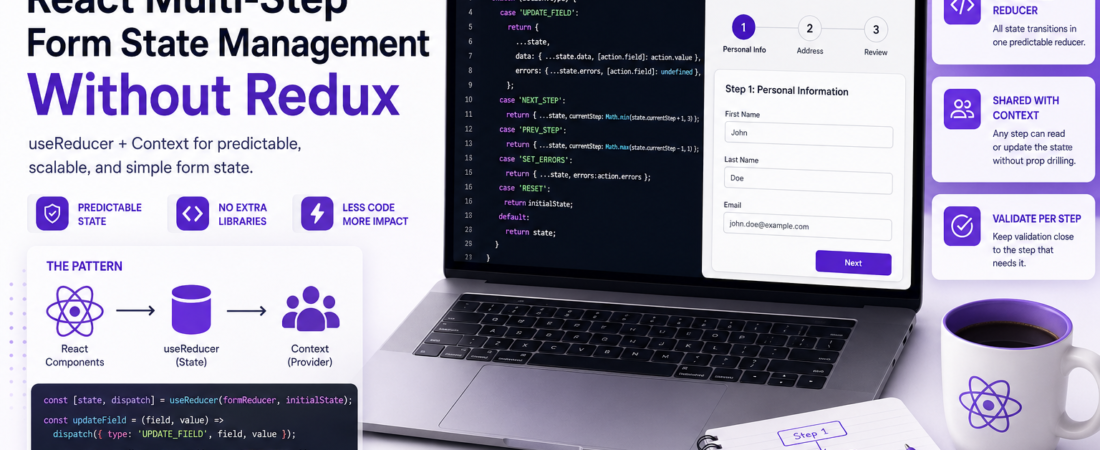
Meta description: I manage multi-step form state in React without Redux — using useReducer and Context. Here’s the exact production pattern that cut my component size in half.
Last updated: June 2026
Introduction
I used to reach for Redux the moment a form had more than two steps. It felt safe — predictable state, dev tools, the works. But one day I inherited a codebase where a three-step checkout form had a full Redux slice, five action creators, and a thunk just to move to the next step. It was absurd. I ripped it all out in an afternoon and replaced it with useReducer + Context, and the component went from 400 lines to 180. That experience changed how I think about React multi-step form state management.
Multi-step form state management in React doesn’t require a global state library. In fact, adding one often creates more problems than it solves — unnecessary boilerplate, tight coupling, and a harder time reasoning about form-specific logic.
TL;DR
- Use
useReducerto manage all form steps and data in one predictable reducer. - Wrap it in a Context provider so any step component can read/write without prop drilling.
- Keep validation per-step and colocate it with each step component — don’t centralize it prematurely.
Why Not Redux (or Zustand) for Multi-Step Form State in React?
Redux and Zustand are powerful tools, but they’re global solutions. Form state is inherently local and ephemeral — it lives for the duration of the user’s session on that form and disappears on submission or cancellation.
Putting form state in a global store creates real problems: state leaks between sessions if you forget to clear it, the store gets polluted with transient UI data, and your form logic becomes entangled with app-wide concerns.
The React team’s own recommendation for complex local state is useReducer. Combine it with useContext and you get something that covers 95% of real-world multi-step form needs without a single extra dependency.
[SOURCE: https://react.dev/learn/scaling-up-with-reducer-and-context]
Prerequisites
Before following along, make sure you’re comfortable with:
- React hooks:
useState,useReducer,useContext,useCallback - Creating custom hooks
- Basic TypeScript (examples use TS, but the patterns apply to JS too)
- React 18+ (all examples use functional components)
Step-by-Step Implementation
Step 1: Define Your Form State Shape
Start by modeling what your form data looks like across all steps. I always do this first — it forces clarity before writing a single line of logic.
// types/form.ts

export type Step = 1 | 2 | 3;

export interface FormState {
  currentStep: Step;
  data: {
    // Step 1: Personal Info
    firstName: string;
    lastName: string;
    email: string;
    // Step 2: Address
    street: string;
    city: string;
    zip: string;
    // Step 3: Review (read-only, no new fields)
  };
  errors: Partial<Record<keyof FormState['data'], string>>;
  isSubmitting: boolean;
}

export const initialFormState: FormState = {
  currentStep: 1,
  data: {
    firstName: '', lastName: '', email: '',
    street: '', city: '', zip: '',
  },
  errors: {},
  isSubmitting: false,
};
Don’t try to get this perfect on the first pass. I usually sketch it on paper, write the reducer, and come back to adjust the shape.
Step 2: Write the Reducer
The reducer is the heart of the pattern. All state transitions go through here — field updates, step navigation, validation errors, and submission status.
// reducers/formReducer.ts

type FormAction =
  | { type: 'UPDATE_FIELD'; field: keyof FormState['data']; value: string }
  | { type: 'SET_ERRORS'; errors: FormState['errors'] }
  | { type: 'NEXT_STEP' }
  | { type: 'PREV_STEP' }
  | { type: 'SET_SUBMITTING'; value: boolean }
  | { type: 'RESET' };

export function formReducer(state: FormState, action: FormAction): FormState {
  switch (action.type) {
    case 'UPDATE_FIELD':
      return {
        ...state,
        data: { ...state.data, [action.field]: action.value },
        errors: { ...state.errors, [action.field]: undefined }, // clear error on change
      };
    case 'SET_ERRORS':
      return { ...state, errors: action.errors };
    case 'NEXT_STEP':
      return { ...state, currentStep: Math.min(state.currentStep + 1, 3) as Step };
    case 'PREV_STEP':
      return { ...state, currentStep: Math.max(state.currentStep - 1, 1) as Step };
    case 'SET_SUBMITTING':
      return { ...state, isSubmitting: action.value };
    case 'RESET':
      return initialFormState;
    default:
      return state;
  }
}
One real gotcha I hit: clearing the error on UPDATE_FIELD is not optional. Without it, users see stale error messages even after they fix the field. This trips up almost every first implementation.
Step 3: Create the Context and Provider
Now wrap the reducer in a Context provider so every step component can consume it without prop drilling.
// context/FormContext.tsx

import React, { createContext, useContext, useReducer, useCallback } from 'react';
import { formReducer, initialFormState } from '../reducers/formReducer';
import type { FormState, FormAction } from '../types/form';

interface FormContextValue {
  state: FormState;
  dispatch: React.Dispatch<FormAction>;
  updateField: (field: keyof FormState['data'], value: string) => void;
  nextStep: () => void;
  prevStep: () => void;
}

const FormContext = createContext<FormContextValue | null>(null);

export function FormProvider({ children }: { children: React.ReactNode }) {
  const [state, dispatch] = useReducer(formReducer, initialFormState);

  const updateField = useCallback(
    (field: keyof FormState['data'], value: string) =>
      dispatch({ type: 'UPDATE_FIELD', field, value }),
    []
  );

  const nextStep = useCallback(() => dispatch({ type: 'NEXT_STEP' }), []);
  const prevStep = useCallback(() => dispatch({ type: 'PREV_STEP' }), []);

  return (
    <FormContext.Provider value={{ state, dispatch, updateField, nextStep, prevStep }}>
      {children}
    </FormContext.Provider>
  );
}

export function useFormContext() {
  const ctx = useContext(FormContext);
  if (!ctx) throw new Error('useFormContext must be used inside FormProvider');
  return ctx;
}
I expose updateField, nextStep, and prevStep as stable callbacks directly in the context value. This avoids step components having to know about the action types — they just call clean functions.
Step 4: Build the Step Components
Each step is a self-contained component that reads from and writes to the context. Validation lives here too — colocated with the step that needs it.
// steps/StepOne.tsx

import { useFormContext } from '../context/FormContext';

function validateStepOne(data: Pick<FormState['data'], 'firstName' | 'lastName' | 'email'>) {
  const errors: Partial<Record<string, string>> = {};
  if (!data.firstName.trim()) errors.firstName = 'First name is required.';
  if (!data.email.match(/^[^\s@]+@[^\s@]+\.[^\s@]+$/)) errors.email = 'Enter a valid email.';
  return errors;
}

export function StepOne() {
  const { state, updateField, nextStep, dispatch } = useFormContext();
  const { data, errors } = state;

  function handleNext() {
    const errs = validateStepOne(data);
    if (Object.keys(errs).length > 0) {
      dispatch({ type: 'SET_ERRORS', errors: errs });
      return;
    }
    nextStep();
  }

  return (
    <div>
      <h2>Personal Info</h2>
      <input
        value={data.firstName}
        onChange={e => updateField('firstName', e.target.value)}
        placeholder="First name"
      />
      {errors.firstName && <span className="error">{errors.firstName}</span>}

      <input
        value={data.email}
        onChange={e => updateField('email', e.target.value)}
        placeholder="Email"
      />
      {errors.email && <span className="error">{errors.email}</span>}

      <button onClick={handleNext}>Next</button>
    </div>
  );
}
Step 5: Compose the Multi-Step Form Shell
The shell component reads currentStep from context and renders the right step. Navigation state lives in the context — the shell just renders.
// components/MultiStepForm.tsx

import { FormProvider, useFormContext } from '../context/FormContext';
import { StepOne } from '../steps/StepOne';
import { StepTwo } from '../steps/StepTwo';
import { StepThree } from '../steps/StepThree';
import { ProgressBar } from './ProgressBar';

function FormSteps() {
  const { state } = useFormContext();
  return (
    <>
      <ProgressBar current={state.currentStep} total={3} />
      {state.currentStep === 1 && <StepOne />}
      {state.currentStep === 2 && <StepTwo />}
      {state.currentStep === 3 && <StepThree />}
    </>
  );
}

export function MultiStepForm() {
  return (
    <FormProvider>
      <FormSteps />
    </FormProvider>
  );
}
Real-World Tips I Use in Production
Persist to sessionStorage for browser refresh survival. I add a useEffect in the provider that saves state to sessionStorage on every change and initializes from it. Users hate losing form data on accidental refresh.
// Inside FormProvider
useEffect(() => {
  sessionStorage.setItem('multistep-form', JSON.stringify(state));
}, [state]);

const savedState = sessionStorage.getItem('multistep-form');
const [state, dispatch] = useReducer(
  formReducer,
  savedState ? JSON.parse(savedState) : initialFormState
);
Use immer if your state gets deep. For forms with nested objects or arrays (e.g., line items, multiple addresses), spreading manually becomes error-prone. use-immer wraps useReducer with Immer and eliminates spread bugs entirely.
Debounce async field validation. If a field needs server-side validation (like checking if an email already exists), debounce the API call with useCallback + a 300ms delay. Don’t validate on every keystroke.
Pro Tip: Add an
isDirtyflag to your state shape that flips totrueon the firstUPDATE_FIELDaction. Use it to gate the “confirm navigation away” browser prompt — only show it if the user has actually typed something.
Common Errors and How I Fixed Them
Error: “Cannot update a component while rendering a different component” This happens when you call dispatch directly during render (e.g., in the body of a component). Move all dispatch calls into event handlers or useEffect.
Error: Context value is stale inside a callback If you destructure from context inside a useCallback with an empty dependency array, you’ll get stale state. Either include state in the dependency array or use useRef to hold the latest dispatch.
Error: Step validation re-runs on every render Define validation functions outside the component (as I did in the StepOne example above) or wrap them in useCallback. Defining them inline inside the component body creates new function references on every render.
[SOURCE: https://react.dev/reference/react/useReducer]
How Do I Handle React Multi-Step Form State Without Any Library?
Use useReducer for state transitions and useContext to share state across steps. This gives you predictable, reducer-driven state without any external dependencies. The pattern scales well up to 5–7 steps before you’d consider anything more complex.
FAQ
Q: Should I use React Hook Form with a multi-step form instead of useReducer? A: React Hook Form is excellent for single-step forms with complex validation. For multi-step forms, it can work, but you lose the single source of truth for cross-step state unless you use useFormContext from RHF carefully. For most cases, the useReducer + Context approach I described is simpler and more transparent.
Q: How do I preserve multi-step form data across browser refreshes in React? A: Initialize your useReducer from sessionStorage and sync state back on every change with a useEffect. Use sessionStorage (not localStorage) because form data should clear when the tab closes.
Q: What’s the best way to validate individual steps in a multi-step form? A: Colocate validation logic with each step component. Write a pure validation function that takes the step’s slice of form data and returns an errors object. Run it on “Next” click, dispatch SET_ERRORS if any errors exist, and prevent navigation. This keeps validation logic discoverable and testable.
Q: How do I handle async submission in a multi-step form with useReducer? A: Dispatch SET_SUBMITTING: true before your API call and SET_SUBMITTING: false in the finally block. On success, dispatch RESET to clear the form. On error, dispatch SET_ERRORS with server-returned field errors mapped to your state shape.
Conclusion
React multi-step form state management is a solved problem — and you don’t need Redux to solve it. A well-written useReducer + Context pattern is explicit, testable, easy to debug, and carries zero extra dependencies. I’ve shipped this pattern in production forms with up to eight steps and thousands of daily users without ever wishing I’d added a global state library.
If you’ve been defaulting to Redux for forms out of habit, try this approach on your next feature. I think you’ll be surprised how little you miss it.
Have a different approach you’ve used in production? Drop it in the comments — I’m always curious how other engineers are solving this.
About the Author
I’m a senior frontend engineer with 9 years of experience building React applications for SaaS products, e-commerce platforms, and enterprise dashboards. My primary stack is React, TypeScript, Node.js, and Go. I write about practical engineering patterns that I’ve actually battle-tested in production — no toy examples, no hand-waving.