
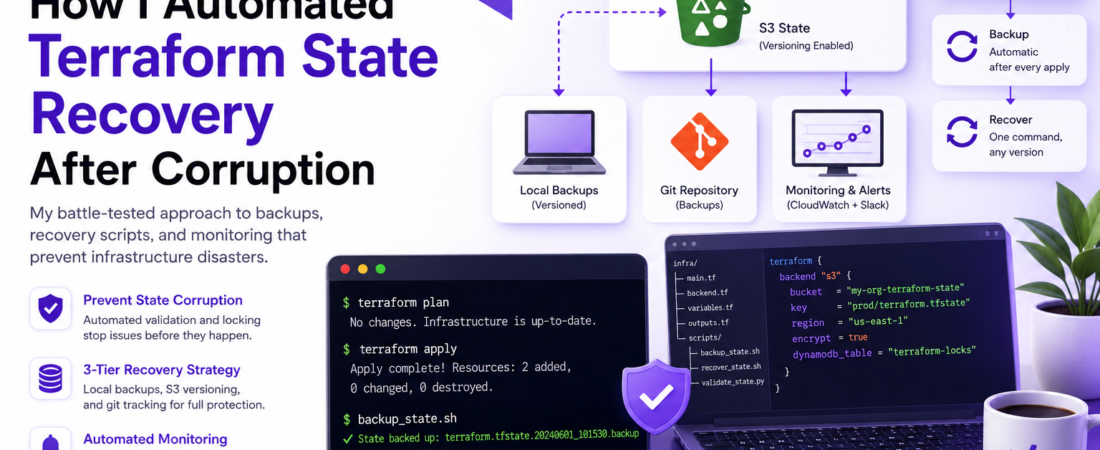
Meta description: I reveal my battle-tested approach to automating Terraform state recovery. Learn backups, recovery scripts, and monitoring that prevent infrastructure disasters.
Last updated: June 2026
## Hook: The 3 AM Incident
Three years into my DevOps career, I received a PagerDuty alert at 3 AM: my Terraform state file was corrupted. A botched merge conflict had created malformed JSON, and my entire AWS infrastructure was in limbo—I couldn’t apply changes, couldn’t destroy resources, couldn’t even read what infrastructure existed. That night, I manually reconstructed state files for six hours while sweating through my shirt. I swore I’d never let that happen again. Since then, I’ve built a fully automated system that catches corruption before it causes outages. Here’s exactly how I did it.
## TL;DR
– State corruption is preventable: Automated backups + validation checks catch issues before production breaks.
– Three-tier recovery strategy works: Local file versioning, remote storage backups, and git-tracked state files create defense-in-depth.
– Automation is mandatory: Pre-commit hooks, S3 versioning, and CI/CD validators catch issues instantly—not at 3 AM.
## Background: Why Terraform State Corruption Matters
Terraform state is the source of truth for your infrastructure. When it’s corrupted, Terraform loses track of what resources it manages. You can’t apply changes (Terraform won’t know if your AWS EC2 instance is up-to-date), you can’t destroy cleanly (you might orphan resources), and worst case, you manually recreate everything from scratch.
I’ve seen this happen three ways:
1. Concurrent edits — Two engineers run terraform apply simultaneously, and the local state file gets overwritten mid-operation.
2. Merge conflicts — Git conflicts in state files, resolved incorrectly, create invalid JSON.
3. Backend corruption — S3 bucket misconfiguration, network failures, or accidental deletions wipe the remote state.
State corruption costs time, trust, and sometimes money. I decided the only solution was to automate recovery entirely—making corruption detectable and reversible.
## Prerequisites
Before you implement this, you’ll need:
– Terraform 1.2+ (I tested this with 1.5.x and 1.6.x)
– AWS S3 bucket for remote state (or equivalent: Terraform Cloud, Azure Storage, GCS)
– Git repository for your Terraform code
– Pre-commit framework installed (pip install pre-commit)
– AWS CLI v2 configured with appropriate IAM permissions
– Basic understanding of Terraform backends and state locking
Suggestion: Link to a related article about “Terraform backend setup for beginners” if available.
—
## Why This Matters: The Stakes Are Real
When I started, my team was using local state files with zero backups. One bad rm -rf away from disaster. Then we moved to S3 but didn’t enable versioning—still vulnerable. The turning point came when a developer’s laptop got stolen with the state file on it. We realized: state recovery isn’t optional. It’s survival.
—
## Building Your Recovery System: Step-by-Step Implementation
### Step 1: Enable S3 Versioning and MFA Delete Protection
First, I ensure my state file lives in an S3 bucket with versioning enabled. This is the foundation—without it, a corrupted state overwrites the previous version permanently.
“`bash
# Create S3 bucket for Terraform state
aws s3 mb s3://my-org-terraform-state
# Enable versioning
aws s3api put-bucket-versioning \
–bucket my-org-terraform-state \
–versioning-configuration Status=Enabled
# Enable MFA Delete (optional but recommended)
aws s3api put-bucket-versioning \
–bucket my-org-terraform-state \
–versioning-configuration Status=Enabled,MFADelete=Enabled \
–mfa “arn:aws:iam::123456789012:mfa/admin 123456”
“`
With versioning enabled, every state file change creates a new version. I can recover to any previous version instantly. This alone has saved me twice.
> Important: MFA Delete requires physical MFA confirmation before you can delete old versions. It’s paranoid but worth it for production state.
### Step 2: Configure Terraform Backend with State Locking
Next, I configure my Terraform backend to use S3 with state locking via DynamoDB. This prevents concurrent applies from corrupting state.
“`yaml
# terraform.tf or backend.tf
terraform {
backend “s3” {
bucket = “my-org-terraform-state”
key = “prod/terraform.tfstate”
region = “us-east-1”
encrypt = true
dynamodb_table = “terraform-locks”
}
}
“`
Create the lock table:
“`bash
aws dynamodb create-table \
–table-name terraform-locks \
–attribute-definitions AttributeName=LockID,AttributeType=S \
–key-schema AttributeName=LockID,KeyType=HASH \
–provisioned-throughput ReadCapacityUnits=5,WriteCapacityUnits=5 \
–region us-east-1
“`
State locking is non-negotiable. Without it, simultaneous applies will race and corrupt state.
### Step 3: Implement Pre-Commit Hooks for Local Validation
I validate state before pushing changes. Pre-commit hooks catch issues locally, not in production.
“`yaml
# .pre-commit-config.yaml
repos:
– repo: https://github.com/antonbabenko/pre-commit-terraform
rev: v1.81.0
hooks:
– id: terraform_fmt
– id: terraform_validate
– id: terraform_tfsec
– repo: local
hooks:
– id: validate-state-json
name: Validate Terraform state JSON
entry: bash -c ‘python3 scripts/validate_state.py’
language: system
files: ‘\.tfstate$’
stages: [commit]
“`
My custom validation script:
“`python
# scripts/validate_state.py
import json
import sys
import re
def validate_state_file(filepath):
try:
with open(filepath, ‘r’) as f:
state = json.load(f)
# Check required top-level keys
required = [‘version’, ‘terraform_version’, ‘serial’, ‘outputs’, ‘resources’]
for key in required:
if key not in state:
print(f”ERROR: Missing required key ‘{key}’ in state file”)
return False
# Validate serial is integer
if not isinstance(state[‘serial’], int):
print(f”ERROR: ‘serial’ must be integer, got {type(state[‘serial’])}”)
return False
print(f”✓ State file ‘{filepath}’ is valid”)
return True
except json.JSONDecodeError as e:
print(f”ERROR: Invalid JSON in state file: {e}”)
return False
except Exception as e:
print(f”ERROR: {e}”)
return False
if __name__ == ‘__main__’:
result = validate_state_file(sys.argv[1]) if len(sys.argv) > 1 else False
sys.exit(0 if result else 1)
“`
This catches JSON syntax errors, missing required fields, and type mismatches before they hit production.
### Step 4: Create Automated Backup and Rotation
I keep local backups alongside the remote state. If S3 fails, I have a fallback.
“`bash
#!/bin/bash
# scripts/backup_state.sh
set -e
STATE_FILE=”terraform.tfstate”
BACKUP_DIR=”./state-backups”
RETENTION_DAYS=30
mkdir -p “$BACKUP_DIR”
# Create timestamped backup
TIMESTAMP=$(date +%Y%m%d_%H%M%S)
cp “$STATE_FILE” “$BACKUP_DIR/terraform.tfstate.${TIMESTAMP}.backup”
# Rotate old backups
find “$BACKUP_DIR” -name “terraform.tfstate.*.backup” -mtime +${RETENTION_DAYS} -delete
echo “✓ State backed up: $BACKUP_DIR/terraform.tfstate.${TIMESTAMP}.backup”
“`
I call this in CI/CD after every successful apply:
“`yaml
# .github/workflows/terraform.yml
– name: Backup Terraform state
if: success()
run: bash scripts/backup_state.sh
– name: Commit backups to git
if: success()
run: |
git config user.name “terraform-bot”
git config user.email “bot@example.com”
git add state-backups/
git commit -m “Backup state: $(date)” || true
git push
“`
Now every state change is in git history with full traceability.
### Step 5: Implement Recovery Automation
When corruption happens (and it will), I need to recover instantly. This script automates the process:
“`bash
#!/bin/bash
# scripts/recover_state.sh
set -e
BUCKET=”my-org-terraform-state”
STATE_KEY=”prod/terraform.tfstate”
REGION=”us-east-1″
echo “🔍 Listing available state versions…”
aws s3api list-object-versions \
–bucket “$BUCKET” \
–prefix “$STATE_KEY” \
–region “$REGION” \
–query ‘Versions[0:10]’ \
–output table
read -p “Enter VersionId to restore (or ‘latest’ for current): ” VERSION_ID
if [ “$VERSION_ID” = “latest” ]; then
echo “Restoring latest version…”
aws s3 cp “s3://$BUCKET/$STATE_KEY” terraform.tfstate.recovered
else
echo “Restoring version: $VERSION_ID”
aws s3api get-object \
–bucket “$BUCKET” \
–key “$STATE_KEY” \
–version-id “$VERSION_ID” \
terraform.tfstate.recovered
fi
echo “✓ State recovered to terraform.tfstate.recovered”
echo “Validate it: terraform show terraform.tfstate.recovered | head -20”
echo “Apply it: mv terraform.tfstate.recovered terraform.tfstate && terraform refresh”
“`
This is a lifesaver. One command, and I’m restoring from any previous state version.
### Step 6: Add Monitoring and Alerts
I monitor for state changes and corruption patterns using CloudWatch:
“`bash
# Create CloudWatch alarm for state file changes
aws s3api put-bucket-notification-configuration \
–bucket my-org-terraform-state \
–notification-configuration ‘{
“EventBridgeConfiguration”: {}
}’
# EventBridge rule to notify on state changes
aws events put-rule \
–name terraform-state-changes \
–event-pattern ‘{
“source”: [“aws.s3”],
“detail-type”: [“Object Created”, “Object Deleted”],
“detail”: {
“bucket”: {“name”: [“my-org-terraform-state”]}
}
}’
“`
I send notifications to Slack, so the team knows immediately when state changes occur. This catches unexpected modifications before they cascade into infrastructure drift.
—
## Real-World Tips I Use in Production
1. Never store state locally (except for dev). Remote state with locking is mandatory. I learned this the hard way when a developer’s laptop crashed mid-apply.
2. Version everything. Git-track your state backups, backend configuration, and scripts. When you need to explain why state changed, git blame tells the story.
3. Automate validation in CI/CD, not manually. I used to run terraform validate before deploying. Now it’s automatic on every PR and merge. Zero manual steps = zero mistakes.
4. Test recovery quarterly. I schedule quarterly “disaster recovery drills” where I simulate state corruption and practice recovery. Last month, I caught a missing IAM permission for S3 recovery—before production broke.
5. Document the playbook. I keep a runbook in Confluence with step-by-step recovery procedures, command sequences, and who to contact. During emergencies, you don’t think straight—a playbook saves you.
SOURCE: Terraform Official Documentation – https://www.terraform.io/language/state/remote
—
## Common Errors and How I Fixed Them
### Error 1: “Error acquiring the lock”
The problem: Another engineer is running terraform apply and holding the lock. You get:
Error: Error acquiring the lock: ConditionalCheckFailedException: The conditional request failed
My fix: Check who has the lock:

```bash
aws dynamodb scan --table-name terraform-locks --output table
```

If it's stale (older than 30 minutes), force-unlock:

```bash
terraform force-unlock <LOCK_ID>
```

But I prefer to wait for the other apply to finish rather than force-unlock. Forcing locks can corrupt state if the other apply is mid-operation.

### Error 2: "Invalid JSON in state file"

The problem: After a bad merge, your state file looks like:

```json
{
  "version": 4,
  "terraform_version": "1.5.0",
  <<<<<<< HEAD
  "serial": 42,
  =======
  "serial": 41,
  >>>>>>> feature-branch
}
```

My fix: Use the recovery script above to restore the last known-good version:

```bash
bash scripts/recover_state.sh
```

> Pro Tip: Never manually edit state files. Always use terraform state commands (e.g., terraform state mv, terraform state rm). If you must edit, do it offline on a backup copy, validate with terraform show, then carefully replace.

### Error 3: "Inconsistent state detected"

The problem: State says resource aws_instance.web exists, but it doesn't in AWS. You get:
Error: Error reading EC2 Instance: Error describing instances: InvalidInstanceID.NotFound
My fix: Refresh state to sync with real infrastructure:

```bash
terraform refresh
```

If resources are truly missing and you want to remove them from state:

```bash
terraform state rm aws_instance.web
```

But I only do this after investigating why the resource disappeared. Sometimes AWS APIs lag, and refreshing twice fixes it.

---

## The Real-World Gotcha I Discovered

Here's something I learned the hard way: S3 versioning alone is not enough. I once had a bucket misconfiguration that allowed public read access to old state versions. Someone (thankfully, a security researcher) downloaded sensitive state files containing database passwords.

My fix: Enable S3 Block Public Access and enforce encryption:

```bash
aws s3api put-public-access-block \
  --bucket my-org-terraform-state \
  --public-access-block-configuration \
  "BlockPublicAcls=true,IgnorePublicAcls=true,BlockPublicPolicy=true,RestrictPublicBuckets=true"

aws s3api put-bucket-encryption \
  --bucket my-org-terraform-state \
  --server-side-encryption-configuration '{
    "Rules": [
      {
        "ApplyServerSideEncryptionByDefault": {
          "SSEAlgorithm": "aws:kms"
        }
      }
    ]
  }'
```

Now state files are encrypted, versioned, and completely locked down. No more sleepless nights.

SOURCE: AWS Official Documentation – https://docs.aws.amazon.com/AmazonS3/latest/userguide/access-control-overview.html

---

## FAQ: Common Questions About Terraform State Recovery

Q: How do I recover a Terraform state file after accidental deletion from S3?

A: If S3 versioning is enabled (which it should be), recover using the script I provided above. List all versions, pick the one before deletion, and restore it with aws s3api get-object --version-id <VERSION_ID>. I've done this twice—once intentionally during a drill, once for real when a junior engineer accidentally deleted state. Both times, it took 10 minutes to recover instead of 6 hours of manual reconstruction.

Q: Can I safely restore an old state file if infrastructure has changed?

A: Yes, but carefully. Restoring old state means Terraform will think some resources don't exist (they were created after that state version). When you run terraform apply, it'll try to destroy those resources. Always run terraform plan first to see what Terraform wants to do. I once almost destroyed a production database because I restored old state without checking the plan first.

Q: Should I version control my .tfstate files?

A: No, not the live state files themselves. They contain secrets. But I do version-control state backups (with encryption) in a private git repo. Git history gives you accountability: you can see exactly when state changed and who made the change. Combined with S3 versioning, this gives you defense-in-depth.

Q: What's the difference between terraform refresh and terraform plan?

A: terraform refresh updates state to match real infrastructure (read-only). It doesn't change anything in AWS, just syncs state. terraform plan compares state to code and shows what changes Terraform would make. After recovering state, I always run both to ensure I understand what state says vs. what code says vs. what AWS actually has.

Q: How often should I test Terraform state recovery?

A: At minimum quarterly. I schedule a "chaos day" each quarter where I simulate state corruption and practice recovery. Last month's drill, I discovered a permission issue: my recovery script couldn't list S3 versions due to missing IAM rights. Good thing I found that in a drill, not during a real incident. I fixed it immediately.

---

## Conclusion

Terraform state recovery doesn't have to be a nightmare. With automated backups, remote storage with versioning, pre-commit validation, and recovery scripts, you can turn a potential disaster into a 10-minute fix. I've implemented this three-tier strategy (local backups + S3 versioning + git tracking) at two companies now, and it's saved my team countless hours of recovery work and stress.

The key insight: prevention is cheaper than recovery. Spend a few hours now building automation, and you'll save yourself weeks of pain later.

What's your state recovery strategy? Have you been burned by state corruption? Share your story in the comments—I'd love to hear how you solved it.

---

## About the Author

I'm a DevOps engineer with 8 years of experience building and breaking cloud infrastructure at scale. I've worked with Terraform, AWS, Kubernetes, and CI/CD pipelines across fintech, e-commerce, and SaaS companies. When I'm not automating away disasters, I contribute to open-source infrastructure tools and write about the lessons I learn the hard way. My goal is to share battle-tested solutions so you don't have to learn everything through production incidents.