
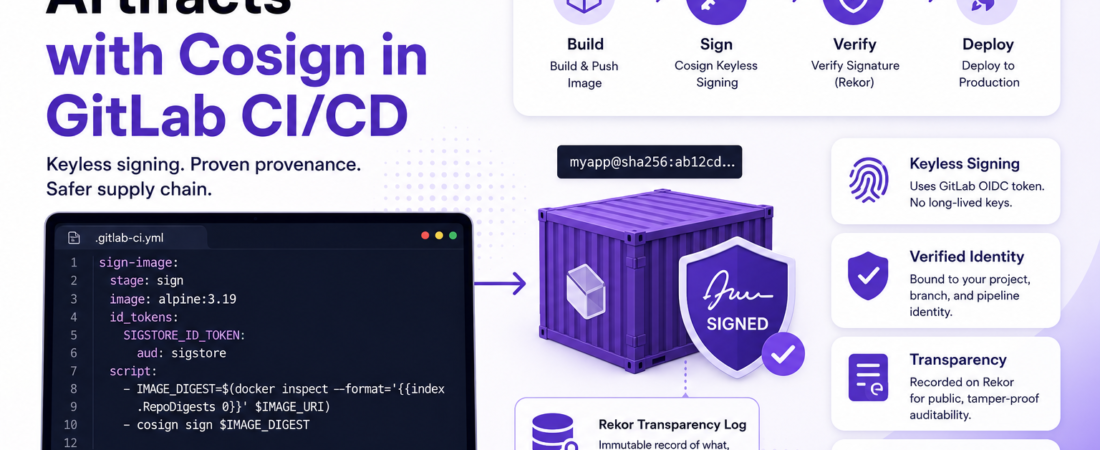
Meta description: I show how to set up Cosign keyless signing in GitLab CI/CD — OIDC config, artifact signing, verification steps, and the real gotchas I hit along the way.
Last updated: June 2, 2025
Last year, a vendor library we’d been pulling into production turned out to have been tampered with between the time it was published and the time we downloaded it. We caught it only because a sharp engineer noticed a checksum mismatch during a manual audit — not because our pipeline enforced it. It was a near miss, and it shook me. After that incident, I spent two weeks implementing proper software artifact signing across all our GitLab pipelines. The tool that made it actually manageable was Cosign, part of the Sigstore project. In this post, I’ll show you how to sign software artifacts with Cosign in a GitLab CI/CD pipeline — from zero to verified signatures in production.
TL;DR
- Cosign keyless signing uses GitLab’s OIDC token to sign artifacts without managing long-lived private keys — no secrets to rotate, no HSM required.
- The signature is recorded on Rekor, an immutable public transparency log, giving you cryptographic proof of what built your artifact and when.
- You can enforce signature verification as a gate in downstream pipeline jobs, preventing unsigned or tampered images from ever reaching production.
Why Signing Software Artifacts in GitLab CI/CD Matters
The SolarWinds attack in 2020 changed how the industry thinks about software supply chain security. Attackers didn’t breach the end product — they compromised the build process and inserted malicious code into a signed artifact that thousands of organizations trusted. The lesson: “it came from our pipeline” is not the same as “it is what our pipeline produced.”
Software artifact signing gives you cryptographic proof of provenance: this exact binary, container image, or package was produced by this exact pipeline job, at this commit, by this identity. If anything changes between build and deployment — even a single byte — the signature verification fails.
Sigstore, the open-source project behind Cosign, Rekor, and Fulcio, makes this practical. Instead of managing private keys (which can be stolen, lost, or forgotten), keyless signing uses short-lived certificates tied to an OIDC identity — in our case, the GitLab CI/CD job itself.
[INTERNAL LINK: related article on supply chain security]
[SOURCE: https://docs.gitlab.com/ci/yaml/signing_examples/]
Prerequisites
Before starting, make sure you have:
- A GitLab.com project (keyless signing requires GitLab.com’s OIDC token endpoint)
- Cosign v2.0.1 or later (v2.x is required — the v1.x API is incompatible)
- A GitLab Container Registry (or another OCI registry) where your image will live
- Docker available in your pipeline runner
- Basic familiarity with
.gitlab-ci.ymlsyntax
Important: The official GitLab docs note a known limitation: the
id_tokensblock must be defined in the project’s own CI/CD config file. It does not work with CI files included from another repository, child pipelines, or AutoDevOps. I hit this immediately when I tried to put the signing job in a shared template — plan accordingly.
Step-by-Step: Cosign Artifact Signing in GitLab CI/CD
Step 1: Understand Keyless Signing and Install Cosign
Keyless signing sounds too good to be true. There are still keys involved — they’re just ephemeral. Here’s what actually happens:
- Your GitLab pipeline job requests an OIDC token from GitLab’s server.
- Cosign sends that token to Fulcio (Sigstore’s certificate authority), which issues a short-lived signing certificate tied to your pipeline’s identity.
- Cosign signs the artifact with the ephemeral key, records the event on Rekor (an immutable transparency log), and discards the key.
- Anyone can verify the signature later using the Rekor entry — no need to distribute or trust a long-lived public key.
To install Cosign locally for testing:
bash
# Install Cosign v2.x via the official install script
curl -O -L "https://github.com/sigstore/cosign/releases/latest/download/cosign-linux-amd64"
sudo mv cosign-linux-amd64 /usr/local/bin/cosign
sudo chmod +x /usr/local/bin/cosign

# Verify
cosign version
# Expected: GitVersion: v2.x.x
Step 2: Configure the GitLab CI/CD OIDC Token for Cosign
This is the most critical configuration step, and it’s where most people get tripped up. The OIDC token must have sigstore as its aud (audience) claim. GitLab exposes this through the id_tokens block in your .gitlab-ci.yml.
Here’s the base config I use:
yaml
variables:
  IMAGE_TAG: $CI_COMMIT_SHORT_SHA
  IMAGE_URI: $CI_REGISTRY_IMAGE:$IMAGE_TAG
  COSIGN_YES: "true"  # Skip interactive prompts in CI

stages:
  - build
  - sign
  - verify

build-image:
  stage: build
  image: docker:24.0
  services:
    - docker:24.0-dind
  before_script:
    - docker login -u "$CI_REGISTRY_USER" -p "$CI_REGISTRY_PASSWORD" "$CI_REGISTRY"
  script:
    - docker build -t "$IMAGE_URI" .
    - docker push "$IMAGE_URI"
Step 3: Sign a Container Image After Build
Now the signing job. Notice that I sign the image by digest rather than by tag. Tags are mutable — anyone can push a new image to myapp:latest. A digest is immutable. Signing the digest is the only way to guarantee you’re verifying what you built.
yaml
sign-image:
  stage: sign
  image: alpine:3.19
  id_tokens:
    SIGSTORE_ID_TOKEN:
      aud: sigstore  # This exact value is required by Fulcio
  before_script:
    - apk add --no-cache cosign docker-cli
    - docker login -u "gitlab-ci-token" -p "$CI_JOB_TOKEN" "$CI_REGISTRY"
  script:
    # Get the immutable digest of the image we just pushed
    - IMAGE_DIGEST=$(docker inspect --format='{{index .RepoDigests 0}}' "$IMAGE_URI")
    - echo "Signing image digest: $IMAGE_DIGEST"
    # Sign using keyless — SIGSTORE_ID_TOKEN is automatically picked up by Cosign
    - cosign sign "$IMAGE_DIGEST"
  dependencies:
    - build-image
The SIGSTORE_ID_TOKEN environment variable is automatically detected by Cosign v2 — you don’t need to pass it explicitly as a flag. As long as it’s set in your job’s environment, Cosign handles the Fulcio handshake for you.
Pro Tip: Set
COSIGN_YES: "true"in your variables block. Without it, Cosign prompts for confirmation before uploading to Rekor, which hangs your pipeline indefinitely waiting for user input. I spent 20 minutes debugging a stuck pipeline before I found this in the docs.
Step 4: Verify the Signature in a Downstream Job
Signing is useless without verification. Here’s how I add a verification step before any deployment job runs:
yaml
verify-signature:
  stage: verify
  image: alpine:3.19
  before_script:
    - apk add --no-cache cosign
  script:
    - IMAGE_DIGEST=$(echo "$CI_REGISTRY_IMAGE@$(cosign triangulate $IMAGE_URI --type digest)")
    - cosign verify "$IMAGE_DIGEST"
        --certificate-oidc-issuer="https://gitlab.com"
        --certificate-identity-regexp="https://gitlab.com/$CI_PROJECT_PATH/.*"
  dependencies:
    - sign-image
The --certificate-identity-regexp flag is important — it verifies not just that the image was signed, but that it was signed by your pipeline in your project. Without this constraint, you’d accept signatures from any Cosign user.
Step 5: Enforce Signature Verification as a Deployment Gate
The real power comes from making verification a blocking condition before deployment. Here’s my full deploy stage with enforcement:
yaml
deploy-production:
  stage: deploy
  image: alpine:3.19
  environment: production
  before_script:
    - apk add --no-cache cosign kubectl
  script:
    # Verify signature — pipeline fails hard if this fails
    - |
      cosign verify "$CI_REGISTRY_IMAGE@$IMAGE_DIGEST" \
        --certificate-oidc-issuer="https://gitlab.com" \
        --certificate-identity-regexp="https://gitlab.com/$CI_PROJECT_PATH/.*" \
        || (echo "Signature verification failed. Refusing to deploy." && exit 1)
    - kubectl set image deployment/myapp myapp="$CI_REGISTRY_IMAGE@$IMAGE_DIGEST"
  rules:
    - if: $CI_COMMIT_BRANCH == "main"
  needs:
    - verify-signature
By chaining needs: [verify-signature], the deploy job is blocked until verification passes. If someone manually pushes an unsigned image to your registry, the deploy pipeline rejects it before it ever touches Kubernetes.
[SOURCE: https://about.gitlab.com/blog/keyless-signing-with-cosign/]
Real-World Tips I Use in Production
Always sign the digest, never the tag. I said it above, but it’s worth repeating. Signing myapp:latest signs the tag pointer at a moment in time — not the content. Use docker inspect --format='{{index .RepoDigests 0}}' to get the digest after push.
Store the digest as a pipeline artifact. I write IMAGE_DIGEST to a file in the build job and pass it as a job artifact so all downstream jobs use the exact same digest string — no risk of race conditions if someone pushes a new tag between jobs.
Log the Rekor entry URL. After signing, Cosign prints a Rekor transparency log URL. I capture it and add it as a comment to the merge request using the GitLab API. This gives reviewers a permanent, public audit trail linked directly to the MR.
Common Errors and How I Fixed Them
Error 1: Error: failed to get tokens: missing "sigstore" audience
This means your id_tokens block is either missing or has the wrong audience. The aud value must be exactly sigstore — not https://sigstore.dev, not cosign. Just the string sigstore. Double-check your YAML indentation too; the id_tokens block is a peer of script and before_script, not nested inside them.
Error 2: Error: signing [image]: accessing entity: GET https://registry.gitlab.com/v2/...: unexpected status code: 401
This one took me a while. It means Cosign can’t authenticate to your registry to write the signature (signatures are stored as OCI artifacts alongside your image). Fix: make sure your before_script includes docker login using the CI job token, and that your project has Container Registry enabled. The login for Cosign uses the same registry credentials as Docker.
FAQ
Q: Does Cosign keyless signing work with GitLab self-managed instances, or only GitLab.com? A: Currently, keyless signing with Sigstore’s public Fulcio and Rekor infrastructure requires GitLab.com’s OIDC token endpoint. For self-managed GitLab, you’d need to either run your own Sigstore instance or use key-based signing instead of keyless. GitLab’s official docs note this as a current limitation.
Q: What happens if the Rekor transparency log is unavailable when my pipeline runs? A: Cosign will fail the signing step, which means your pipeline fails. This is the right behavior — you don’t want to ship unsigned artifacts just because a transparency log was temporarily unavailable. For high-availability requirements, you can run a private Rekor instance or use --tlog-upload=false for air-gapped environments, at the cost of reduced auditability.
Q: How is Cosign keyless signing different from traditional GPG artifact signing? A: GPG signing requires you to generate, store, and protect a long-lived private key — and distribute the public key to anyone who needs to verify. If your private key is compromised, all previously signed artifacts are suspect. Cosign keyless uses ephemeral keys tied to an OIDC identity, so there’s no long-lived key to steal. The Rekor log provides the trust anchor instead. It’s a fundamentally different (and operationally simpler) trust model.
Q: Can I use Cosign to sign build artifacts other than container images, like binaries or JAR files? A: Yes. Cosign supports signing arbitrary files using cosign sign-blob. The signature is stored separately (not inside the file), and verification uses cosign verify-blob. For non-OCI artifacts, you’ll need to manage where you store and distribute the signature file — typically alongside the artifact in your artifact storage.
Q: How do I verify a Cosign signature without access to the Rekor log? A: Use cosign verify-blob --offline with a locally bundled signature that includes the Rekor inclusion proof. When signing, generate the bundle with cosign sign-blob --bundle=signature.bundle myfile. The bundle contains everything needed for offline verification — the signature, certificate, and Rekor inclusion proof — without needing network access to Rekor at verification time.
Conclusion
Signing software artifacts with Cosign in GitLab CI/CD used to feel like a niche security concern. After the spate of supply chain attacks over the past few years, it’s table stakes. The keyless approach removes the biggest practical barrier — key management — and GitLab’s native OIDC support makes the integration clean.
Start with Step 3 (signing a single image), get comfortable with the verification command in Step 4, then work backward to enforce it as a hard gate in your deploy jobs. The whole setup takes an afternoon, and it closes a class of supply chain risk that most teams don’t address until it’s too late.
If you’ve already set this up in your pipeline, share your experience in the comments — especially if you’ve tackled self-managed GitLab or air-gapped environments. And if this saved you from a supply chain incident (or helped you explain signing to your team), share it with someone who needs it.
About the Author
I’m a DevSecOps engineer with 12 years of experience securing software delivery pipelines at scale, across industries from financial services to cloud infrastructure. I specialize in supply chain security, CI/CD hardening, and making security tooling actually usable for engineering teams. My day-to-day stack includes GitLab, Kubernetes, Terraform, and Sigstore — and I write here about the practical lessons I learn the hard way so you don’t have to.