
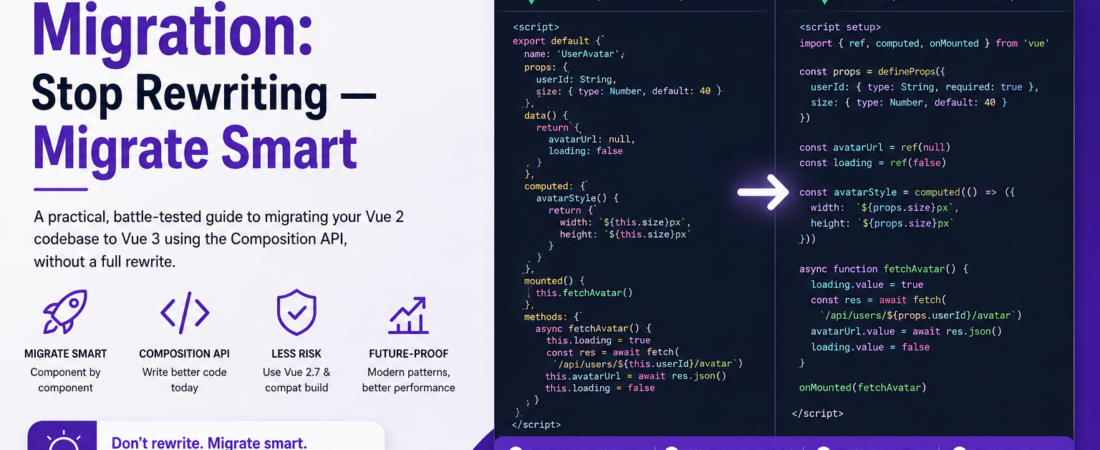
Meta description: I migrated a 40-component Vue 2 codebase to Vue 3 Composition API without a full rewrite. Here’s my exact process, the real errors I hit, and what I’d do differently.
Last updated: June 2026
Introduction
Last year I inherited a Vue 2 codebase with 40+ components, a Vuex store, and exactly zero tests. The team wanted to migrate to Vue 3, and the first suggestion in the room was “let’s just rewrite it.” I’ve been down that road before — the rewrite that takes six months, ships nothing, and eventually gets abandoned. Instead, I spent three weeks doing a Vue 2 to Vue 3 migration component by component, using Vue 3’s Composition API and the official migration build. The app is fully on Vue 3 now, the team prefers the new patterns, and we didn’t lose a single release cycle.
This guide covers the practical decisions I made, the migration order that worked, and the specific errors that cost me the most debugging time — so you don’t have to pay the same tuition.
TL;DR
- Use the Vue 2.7 upgrade as an intermediate step — it backports Composition API to Vue 2 so you can migrate logic before migrating the framework.
- Migrate leaf components first (no children, no Vuex bindings), then work up the tree toward pages and layouts.
- The most common breaking change isn’t reactivity or lifecycle hooks — it’s the removal of
$listeners, event bus patterns, andVue.set(), which fail silently in unexpected ways.
Why Vue 2 to Vue 3 Migration Matters Now
Vue 2 reached end-of-life on December 31, 2023. It no longer receives security patches, and the ecosystem — Vuex, Vue Router, Vetur — has largely moved on. If you’re still on Vue 2 in 2025, you’re accumulating technical debt with each passing month and running a framework with known unpatched vulnerabilities.
Vue 3’s Composition API isn’t just a syntax preference — it solves real problems. Logic sharing across components that previously required mixins (with all their implicit dependencies and namespace collisions) becomes explicit, testable composables. TypeScript support goes from “possible but painful” to first-class. And the performance improvements in Vue 3’s reactivity system are meaningful for complex UIs.
[INTERNAL LINK: related article — Vue 3 composables patterns for large codebases]
[SOURCE: https://v2.vuejs.org/eol/]
Prerequisites
Before migrating, you need:
- Node.js 18+ and npm/yarn/pnpm
- Your existing Vue 2 project with a working dev and build pipeline
- Familiarity with Vue 2 Options API (this guide assumes you know
data(),methods,computed,watch) - At least a basic read of the official Vue 3 migration guide
- About 30 minutes per component for straightforward cases (plan more for Vuex-heavy components)
[SOURCE: https://v3-migration.vuejs.org/]
How to Migrate Vue 2 Components to Vue 3 Composition API
Step 1: Upgrade to Vue 2.7 First
Before touching Vue 3, upgrade to Vue 2.7 (vue@2.7.x). This release backports the Composition API — ref, reactive, computed, watch, onMounted — into Vue 2. That means you can start writing new code and refactoring old components using Composition API today, while still running the Vue 2 runtime.
npm install vue@2.7 @vue/composition-api
# Note: In Vue 2.7, @vue/composition-api is no longer needed —
# Composition API is built in. Uninstall it if present.
npm uninstall @vue/composition-api
Update any imports that used @vue/composition-api:
// Before (Vue 2 + @vue/composition-api plugin)
import { ref, computed } from '@vue/composition-api'

// After (Vue 2.7)
import { ref, computed } from 'vue'
This single step de-risks the entire migration. Your app keeps running. Your team learns Composition API incrementally. I spent two weeks here before touching Vue 3, and it was the right call.
Step 2: Audit Breaking Changes Before Writing a Single Line
Run vue-compat (Vue 3’s compatibility build) against your project and read the output before touching any component. The Vue migration build emits runtime warnings for deprecated APIs so you know exactly what needs to change.
npm install @vue/compat@3
In your vite.config.js or vue.config.js:
// vite.config.js
import { defineConfig } from 'vite'
import vue from '@vitejs/plugin-vue'

export default defineConfig({
  plugins: [
    vue({
      template: {
        compilerOptions: {
          compatConfig: {
            MODE: 2  // Run Vue 3 in Vue 2 compatibility mode
          }
        }
      }
    })
  ],
  resolve: {
    alias: {
      vue: '@vue/compat'
    }
  }
})
Open your app and check the browser console. Every deprecation warning is a migration task. Build your list from these warnings — don’t guess.
Step 3: Migrate a Leaf Component — Side by Side
Start with the simplest component in your tree: no children, no Vuex, ideally just props and local state. Here’s a real example from my migration — a UserAvatar component:
Before (Vue 2 Options API):
<script>
export default {
  name: 'UserAvatar',
  props: {
    userId: {
      type: String,
      required: true
    },
    size: {
      type: Number,
      default: 40
    }
  },
  data() {
    return {
      avatarUrl: null,
      loading: false
    }
  },
  computed: {
    avatarStyle() {
      return { width: `${this.size}px`, height: `${this.size}px` }
    }
  },
  mounted() {
    this.fetchAvatar()
  },
  methods: {
    async fetchAvatar() {
      this.loading = true
      const res = await fetch(`/api/users/${this.userId}/avatar`)
      this.avatarUrl = await res.json()
      this.loading = false
    }
  }
}
</script>
After (Vue 3 Composition API with <script setup>):
<script setup>
import { ref, computed, onMounted } from 'vue'

const props = defineProps({
  userId: { type: String, required: true },
  size:   { type: Number, default: 40 }
})

const avatarUrl = ref(null)
const loading   = ref(false)

const avatarStyle = computed(() => ({
  width:  `${props.size}px`,
  height: `${props.size}px`
}))

async function fetchAvatar() {
  loading.value = true
  const res = await fetch(`/api/users/${props.userId}/avatar`)
  avatarUrl.value = await res.json()
  loading.value = false
}

onMounted(fetchAvatar)
</script>
<script setup> eliminates the boilerplate of return {} entirely. Everything declared in <script setup> is automatically available in the template. It’s one of those changes where you wonder how you tolerated the old way.
Step 4: Replace Vuex with Pinia (or Slim Down First)
Vuex 3 (Vue 2) maps to Vuex 4 (Vue 3) — and Vuex 4 works in Vue 3 with minimal changes. If your Vuex store is large and you need to keep moving, upgrade to Vuex 4 first and save the Pinia migration for later. That’s what I did.
npm install vuex@4
The main breaking change: accessing the store in Composition API components changes from this.$store to useStore():
// Vue 3 + Vuex 4
import { useStore } from 'vuex'
const store = useStore()
const user = computed(() => store.state.user)
If you have a smaller app or you’re doing a greenfield migration, go straight to Pinia. The ergonomics are dramatically better and the TypeScript story is excellent. I migrated six Vuex modules to Pinia stores over two afternoons.
Step 5: Replace Event Bus and $listeners
This was my biggest time sink. Vue 3 removes the global event bus pattern (new Vue() as a bus) and removes $listeners entirely — it’s merged into $attrs.
Replace event bus with a tiny mitt instance or direct composable state:
npm install mitt
// eventBus.js
import mitt from 'mitt'
export const emitter = mitt()

// Emitting
import { emitter } from './eventBus'
emitter.emit('user-updated', payload)

// Listening
import { emitter } from './eventBus'
import { onUnmounted } from 'vue'

emitter.on('user-updated', handler)
onUnmounted(() => emitter.off('user-updated', handler))
Important: Always clean up event listeners in
onUnmounted. I found three memory leaks in the original codebase because the Vue 2 event bus listeners were never removed. Vue DevTools’ memory profiler can help you spot these.
Replace $listeners by passing $attrs directly or using v-bind="$attrs" in the template, which now includes both attributes and listeners in Vue 3.
Step 6: Replace Vue.set() and Array Mutation Methods
Vue 3’s reactivity system is Proxy-based and tracks mutations directly — Vue.set() is gone, and you don’t need it.
// Vue 2 — required Vue.set for reactive array/object mutation
Vue.set(this.users, index, updatedUser)

// Vue 3 — just mutate directly
users.value[index] = updatedUser
// Or for objects:
state.user.name = 'New Name'  // fully reactive
Real-World Tips I Use in Production
Extract logic into composables early. Every time I find myself writing similar ref + watch + onMounted logic in two components, that’s a composable waiting to be extracted. A useUserData(userId) composable that handles fetching, loading state, and error handling is far more testable than the same logic spread across components.
Migrate templates last. The template syntax changes are minimal — mostly v-model argument syntax and key placement on <template v-for>. I saved all template changes for last and batched them, which was much faster than context-switching between script and template simultaneously.
Use defineEmits to document your component’s API. In Vue 2, emitted events were invisible unless you read the methods. In Vue 3, defineEmits(['update:modelValue', 'close']) acts as a self-documenting contract that also gets type-checked.
Common Errors and How I Fixed Them
Error: [Vue warn]: Component emitted event "input" but it is not declared Cause: Vue 3 changed the v-model contract. In Vue 2, v-model used the input event; in Vue 3 it uses update:modelValue. Solution: update your emits from this.$emit('input', val) to emit('update:modelValue', val) and add defineEmits(['update:modelValue']).
Error: TypeError: Cannot read properties of undefined (reading 'state') in Pinia store tests Cause: Tests weren’t wrapping components in a Pinia instance. Solution: add setActivePinia(createPinia()) in your beforeEach block.
import { setActivePinia, createPinia } from 'pinia'
beforeEach(() => setActivePinia(createPinia()))
Error: Filters ({{ value | currency }}) throwing template compile errors Cause: Vue 3 removed filters entirely. Solution: replace with a computed property or a utility function call directly in the template: {{ formatCurrency(value) }}. I wrote a find-and-replace regex to catch all filter usages across the project at once.
grep -rn "| [a-zA-Z]" src/components/ --include="*.vue"
FAQ
Q: How long does a Vue 2 to Vue 3 migration take for a medium-sized app? A: For a 40-component app with a Vuex store, plan on 3–5 weeks if you migrate incrementally — one component at a time — without stopping feature development. A full-team parallel rewrite is faster on paper but rarely is in practice. The Vue 2.7 intermediate step is the single best investment: it lets you run Composition API in production before you ever touch Vue 3.
Q: Can I mix Vue 2 Options API and Vue 3 Composition API in the same project? A: Yes — in Vue 3, Options API is still fully supported. You don’t need to migrate all components at once. <script setup> and export default { data() {} } can coexist in the same project indefinitely. This makes incremental migration genuinely practical instead of an all-or-nothing gamble.
Q: What happens to my Vuex store when migrating to Vue 3? A: Vuex 4 is compatible with Vue 3 and is a safe intermediate step. The core API is essentially unchanged from Vuex 3. However, I’d recommend migrating to Pinia when you have bandwidth — it has better TypeScript support, simpler devtools integration, and the Vuex team itself recommends Pinia for new projects. You can migrate one Vuex module to a Pinia store at a time.
Q: What are the most common breaking changes when migrating Vue 2 components to Vue 3? A: In my experience, the top five are: (1) $listeners removed and merged into $attrs; (2) v-model changed to modelValue/update:modelValue; (3) Vue.set() and Vue.delete() removed; (4) filters removed; (5) global event bus pattern no longer works with new Vue(). The Vue migration build’s runtime warnings catch all of these if you enable compatibility mode before migrating.
Q: Should I use Composition API or Options API for new Vue 3 components? A: Use Composition API with <script setup> for all new components. The Vue core team recommends it for new projects, and the ecosystem is moving firmly in that direction. The ergonomics are better for anything beyond trivial components — logic reuse via composables, TypeScript inference, and tree-shaking all work significantly better with Composition API.
Conclusion
Migrating from Vue 2 to Vue 3 is genuinely manageable if you resist the urge to rewrite everything at once. The path I’d recommend to anyone: upgrade to Vue 2.7, start writing Composition API in new features, then migrate components one by one starting from the leaves. Use the compatibility build’s warnings as your migration checklist. The Composition API ends up being a joy to work with once you clear the learning curve — composables make code sharing explicit and testable in ways that mixins never could.
About the Author
I’m a senior software engineer with 10+ years of experience in frontend and full-stack development, with a particular focus on JavaScript frameworks, TypeScript, and production architecture. I’ve shipped Vue apps ranging from internal dashboards to high-traffic e-commerce storefronts. I write at SpiritCode to make hard engineering problems approachable — because most migration horror stories are really just planning failures in disguise.