
Meta Description: I’ve migrated three legacy monoliths to AWS serverless. Here’s my real step-by-step process, the mistakes I made, and what I’d do differently.
The first time I was handed a “simple serverless migration,” it was anything but simple. The application was a 12-year-old Java monolith running on EC2, with a single relational database, cron jobs buried in application code, and a deployment process that involved SSH-ing into a box and running a shell script someone wrote in 2014. My job was to move it to AWS serverless — Lambda, API Gateway, the works — without taking the system down for more than a scheduled maintenance window.
I’ve since done this two more times, on different codebases, for different companies. Every migration is different, but the mistakes I made the first time taught me a process I now trust. This guide walks through that process — not the idealized version you’ll find in an AWS whitepaper, but the version shaped by things that actually broke in production.
What Is the Best Strategy for Migrating a Monolith to AWS Serverless?
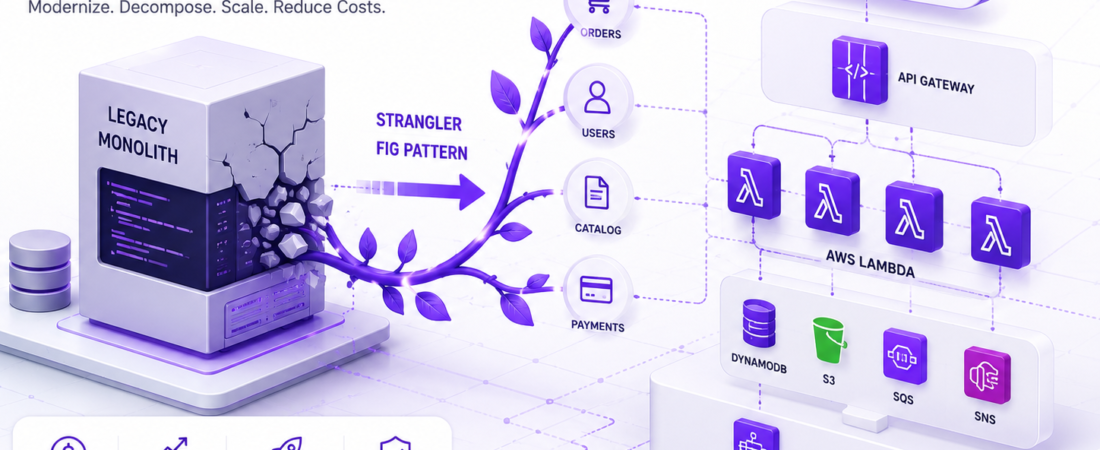
The short answer: don’t do a “big bang” rewrite. In my experience, the strategy that consistently works is the strangler fig pattern — incrementally routing traffic away from the monolith, one capability at a time, into new serverless components, until the monolith has nothing left to do and can be decommissioned.
The high-level phases look like this:
- Map the monolith’s capabilities and their dependencies
- Identify a low-risk, well-bounded capability to migrate first
- Stand up the serverless replacement alongside the monolith
- Route a subset of traffic to the new implementation
- Validate behavior matches the old system
- Cut over fully, then repeat for the next capability
- Decommission the monolith once nothing routes to it anymore
I’ll go through each phase in detail, including the specific AWS services I’ve used and why.
Why Migrate to Serverless At All?
Before committing to a migration this involved, it’s worth being honest about why. In my experience, teams reach for serverless migrations for a few recurring reasons:
- Operational burden. Nobody wants to be the person who understands the deployment script from 2014. Serverless shifts patching, scaling, and infrastructure management to AWS.
- Cost at variable load. If your traffic is spiky, paying for idle EC2 capacity around the clock is wasteful. Lambda’s pay-per-invocation model can meaningfully cut costs for bursty workloads.
- Scaling friction. Monoliths tend to scale as a single unit — you can’t scale just the checkout logic without scaling the entire application server fleet with it.
- Team velocity. Once decomposed, teams can own and deploy individual functions independently instead of coordinating releases through a single deployment pipeline.
That said, serverless isn’t free of tradeoffs — cold starts, execution time limits, and a genuinely different debugging experience are real costs I’ll cover later in this guide. I don’t recommend migrating just because serverless is trendy; I recommend it when the operational and cost problems above are actually the ones you’re facing.
Step 1: Map the Monolith Before You Touch It
This step gets skipped more often than it should, and it’s the one I regretted skipping the first time. Before writing a single Lambda function, I now spend real time building a dependency map of the monolith:
- Which modules talk to the database directly, and which go through a service layer?
- Which endpoints are read-heavy versus write-heavy?
- Where does shared state live — session data, caches, in-memory queues?
- What scheduled jobs exist, and what do they actually do?
- Which parts of the codebase have the most git commit activity (a decent proxy for “actively used and actively changing”)?
I generally use a mix of static analysis tools, request logging (to see what’s actually being called in production versus what’s dead code), and interviews with whoever’s been on the team longest. On my first migration, I skipped the “what’s actually dead code” step and spent two weeks migrating a reporting endpoint that, it turned out, hadn’t been called in over a year.
Step 2: Pick the Right First Capability to Migrate
Not every capability is a good candidate to migrate first. I look for capabilities that are:
- Well-bounded — clear inputs and outputs, minimal shared state with the rest of the system
- Low-risk — not on the critical path for revenue or core user flows
- Independently testable — I can write integration tests that validate behavior without needing the entire monolith running
In my most recent migration, that was a PDF invoice-generation endpoint. It took a well-defined input (an order ID), read from the database, and returned a file. No side effects on other parts of the system, no complex session handling. It was the perfect low-risk first target to prove out the migration pattern before touching anything customer-facing.
Step 3: Standing Up the Serverless Replacement
Here’s a simplified version of the architecture I used for that invoice-generation capability:
API Gateway (/invoices/{orderId})
        │
        ▼
   AWS Lambda (Python)
        │
        ├──► RDS Proxy ──► existing PostgreSQL database
        │
        └──► S3 (store generated PDF)
I intentionally pointed the new Lambda function at the same database the monolith was already using, via RDS Proxy (which handles connection pooling — something that matters a lot when Lambda can spin up many concurrent executions, each opening its own database connection). I didn’t touch the data layer in this phase. Migrating the compute layer and the data layer at the same time is exactly the kind of “big bang” complexity the strangler fig pattern is meant to avoid.
Here’s a trimmed version of the actual Lambda handler:
import json
import boto3
from db import get_order  # shared connection logic via RDS Proxy
from pdf_generator import generate_invoice_pdf

s3 = boto3.client("s3")
BUCKET_NAME = "invoices-generated"

def handler(event, context):
    order_id = event["pathParameters"]["orderId"]

    try:
        order = get_order(order_id)
    except OrderNotFoundError:
        return {
            "statusCode": 404,
            "body": json.dumps({"error": "Order not found"})
        }

    pdf_bytes = generate_invoice_pdf(order)
    key = f"invoices/{order_id}.pdf"

    s3.put_object(
        Bucket=BUCKET_NAME,
        Key=key,
        Body=pdf_bytes,
        ContentType="application/pdf"
    )

    return {
        "statusCode": 200,
        "body": json.dumps({
            "invoiceUrl": f"https://{BUCKET_NAME}.s3.amazonaws.com/{key}"
        })
    }
A few decisions worth explaining:
- Error handling returns explicit status codes rather than letting exceptions propagate as generic 500s — I learned this matters a lot for API Gateway’s default error mapping, which isn’t always intuitive out of the box.
- The PDF is stored in S3, not returned directly in the Lambda response. API Gateway has a payload size limit (currently 10MB for REST APIs), and generated PDFs can occasionally exceed that for large invoices. Returning a URL instead of the raw bytes sidesteps that limit entirely.
- Database access goes through a shared
db.pymodule using RDS Proxy, not a fresh raw connection per invocation, to avoid exhausting the database’s connection limit under concurrent load — this was the single most common failure I hit in my first migration attempt.
Step 4: Routing Traffic Gradually
Rather than switching all invoice-generation traffic to the new Lambda at once, I used a feature flag at the API Gateway / load balancer layer to route a small percentage of traffic to the new implementation first. Some approaches I’ve used across different migrations:
| Routing Method | How It Works | When I Use It |
|---|---|---|
| Weighted routing (Route 53 or ALB) | Splits traffic by percentage between old and new endpoints | When old and new systems are behind different domains/paths |
| Feature flag in the monolith | Monolith itself decides whether to call the new Lambda or handle the request itself | When I want fine-grained control per user or per request type |
| API Gateway canary deployments | Native support for routing a percentage of traffic to a new stage | When the new implementation is already fully behind API Gateway |
For the invoice example, I used a feature flag inside the monolith itself: the existing endpoint checked a flag, and if enabled for that account, proxied the request to the new Lambda-backed endpoint instead of generating the PDF locally. This let me roll out gradually, account by account, and roll back instantly if something went wrong — no deployment required, just a flag flip.
Step 5: Validating Behavior Matches
This is the step I underestimated the most on my first migration. “It returns a 200 and a PDF” isn’t the same as “it behaves identically to the old system.” I now run a validation phase where, for a period of time, requests are sent to both the old and new implementations, and I diff the outputs — this is sometimes called shadow testing or dark launching.
For the invoice case, that meant comparing generated PDF content (not byte-for-byte, since fonts and rendering libraries can introduce trivial differences, but comparing extracted text and key totals) between the monolith’s output and the new Lambda’s output for the same order IDs. I found and fixed three subtle bugs this way before ever exposing the new path to real users — including a rounding difference in tax calculation that would have been a genuinely bad thing to ship silently.
Step 6: Full Cutover and Decommissioning
Once validation is clean and the feature flag has been at 100% for a period I’m comfortable with (I typically hold at 100% for one to two full business cycles before removing the old code path), I remove the old implementation from the monolith entirely. This isn’t just about tidiness — dead code in a monolith becomes a maintenance and security liability, and leaving it “just in case” defeats the purpose of the migration.
I repeat this entire process — map, pick, build, route, validate, cut over — for each subsequent capability, usually working from lowest-risk to highest-risk.
Common Mistakes I’ve Made (and Now Avoid)
- Migrating the data layer and compute layer simultaneously. Trying to move to DynamoDB and Lambda at the same time as decomposing a capability multiplies the number of things that can go wrong at once. I now always migrate compute first, against the existing database, and treat data layer changes as a separate, later project.
- Underestimating cold starts for latency-sensitive endpoints. Lambda cold starts (particularly for languages with heavier runtime initialization) can add hundreds of milliseconds. For latency-sensitive, high-traffic paths, I’ve used provisioned concurrency to mitigate this — though it does reduce some of the cost benefit of pure pay-per-invocation pricing.
- Not accounting for Lambda’s execution time limit. Lambda functions max out at 15 minutes of execution time. Long-running batch jobs buried in the monolith (a common thing to find in a 12-year-old codebase) often need to be redesigned around Step Functions or broken into smaller chunked units of work rather than ported as-is.
- Forgetting about connection limits on the shared database. Lambda can scale to a large number of concurrent executions very quickly, and each one opening a raw database connection can exhaust your database’s max connections. RDS Proxy solved this for me, but it’s a step people forget until they hit it in production.
- Treating this as a one-time project instead of an ongoing capability-by-capability process. The migrations I’ve seen go worst are the ones where a team tries to “finish serverless” in a single quarter. The ones that go well treat it as a sustained pattern applied incrementally over many quarters.
Monolith vs. Serverless: A Practical Comparison
| Factor | Monolith (EC2-based) | AWS Serverless (Lambda-based) |
|---|---|---|
| Scaling | Scales as a single unit | Scales per-function, automatically |
| Cost at low/spiky traffic | Pay for idle capacity | Pay per invocation |
| Cost at sustained high traffic | Often cheaper at scale | Can become more expensive without careful tuning |
| Deployment | Single coordinated release | Independent per-function deploys |
| Debugging | Familiar, attach a debugger locally | Distributed tracing required (X-Ray or similar) |
| Cold start latency | Not applicable | Present, mitigable with provisioned concurrency |
| Long-running jobs | No inherent time limit | 15-minute Lambda execution limit; needs Step Functions for longer workflows |
| Operational overhead | Patching, scaling, provisioning managed by the team | Largely managed by AWS |
Best Practices Checklist
- [ ] Full dependency and capability map created before migration starts
- [ ] First migrated capability is well-bounded, low-risk, and independently testable
- [ ] Compute layer migrated before data layer, not simultaneously
- [ ] Database access from Lambda goes through connection pooling (RDS Proxy or similar)
- [ ] Traffic routed gradually via feature flag, weighted routing, or canary deployment
- [ ] Shadow testing or output diffing used to validate behavior before full cutover
- [ ] Long-running jobs redesigned around Step Functions where they exceed Lambda’s time limit
- [ ] Provisioned concurrency evaluated for latency-sensitive endpoints
- [ ] Old code path fully removed after a comfortable validation period at 100% traffic
- [ ] Process repeated capability-by-capability, not attempted as a single large rewrite
Security Considerations
Migrating to serverless changes your security model in ways worth planning for explicitly. IAM roles need to be scoped per-function rather than relying on a single broad EC2 instance role — I give each Lambda function only the permissions it actually needs (read access to a specific S3 bucket, not s3:*, for example). I also make sure secrets (database credentials, API keys) are pulled from AWS Secrets Manager or Parameter Store at runtime rather than baked into environment variables at deploy time, since Lambda environment variables are visible to anyone with read access to the function configuration in the console.
Frequently Asked Questions
Is the strangler fig pattern the only way to migrate a monolith to serverless?
No, but in my experience it’s the lowest-risk approach for production systems that can’t tolerate extended downtime. A full rewrite can work for smaller applications with limited scope, but for a 12-year-old monolith with unclear dependencies, incremental migration reduces the blast radius of any single mistake.
How long does a typical monolith-to-serverless migration take?
It varies enormously based on the monolith’s size and how well-understood its dependencies are, but in my experience, migrations spanning many capabilities tend to run over multiple quarters rather than weeks, especially when done incrementally and validated carefully at each step.
Do I need to migrate my database to DynamoDB to use Lambda?
No. I’ve run Lambda functions against existing relational databases (PostgreSQL, MySQL) via RDS Proxy for connection pooling. Migrating to DynamoDB is a separate decision that should be made based on your actual access patterns, not treated as a required step of a serverless migration.
What happens to long-running batch jobs when migrating to Lambda?
Since Lambda functions have a maximum execution time of 15 minutes, long-running jobs typically need to be redesigned as a series of smaller steps orchestrated by AWS Step Functions, or broken into chunks processed asynchronously via SQS.
How do I handle cold starts in a serverless migration?
For latency-sensitive endpoints, I’ve used provisioned concurrency to keep a warm pool of Lambda instances ready, which eliminates most cold start latency at the cost of paying for that reserved capacity even when idle.
Should I migrate the riskiest, most complex part of the monolith first to get it out of the way?
I don’t recommend this. Starting with a low-risk, well-bounded capability lets you validate your migration process, tooling, and monitoring before you’re operating on something business-critical.
Can I run the monolith and the serverless components at the same time indefinitely?
Technically yes, but I don’t recommend leaving it that way long-term. Running both increases operational complexity and cognitive load for the team. The goal of the strangler fig pattern is a full transition, even if it happens gradually over an extended period.
Final Summary
Migrating a legacy monolith to AWS serverless architecture isn’t about a single dramatic cutover — it’s about incrementally strangling the old system, one well-bounded capability at a time, while carefully validating that new behavior matches old behavior before fully committing. The teams (and the version of myself) that got burned were the ones that tried to migrate compute and data simultaneously, skipped shadow testing, or underestimated Lambda’s execution time and cold start characteristics.
If you’re planning a migration like this, start by mapping the monolith honestly, pick a genuinely low-risk first capability, and build the validation and rollback mechanisms before you need them — not after something breaks in production.
Looking for more hands-on AWS and cloud architecture guides? Explore more tutorials on serverless patterns, Lambda, and infrastructure migration over on SpiritCode.blog — real production lessons, not just documentation summaries.