
Published on SpiritCode.blog | Data Engineering & Compliance
When I joined a healthcare analytics startup a few years back, one of the first things that landed on my desk was a compliance audit report with a long list of red flags. Patient names in plaintext. Social Security Numbers sitting in a staging table. ZIP codes so specific they could re-identify individuals. The engineering team had built a fast ETL pipeline — but nobody had baked PII protection into the process from the start.
That experience taught me something I now consider a core engineering principle: HIPAA compliance isn’t a feature you add later. It’s architecture you design upfront.
In this post, I’ll walk you through a battle-tested approach to automating data masking in Python ETL pipelines — one that actually holds up under a compliance review.
Why HIPAA Compliance in ETL Is Harder Than It Looks
The Health Insurance Portability and Accountability Act (HIPAA) defines 18 categories of Protected Health Information (PHI) — from names and dates to device identifiers and IP addresses. The challenge in ETL work is that this data flows through your pipeline constantly: from source systems, through transformation layers, into analytics warehouses.
Most teams get caught on two specific failure modes:
- Masking happens too late — data lands in staging tables unprotected, violating the minimum necessary standard.
- Masking is inconsistent — a patient record masked in one pipeline isn’t masked the same way in another, breaking referential integrity for analytics.
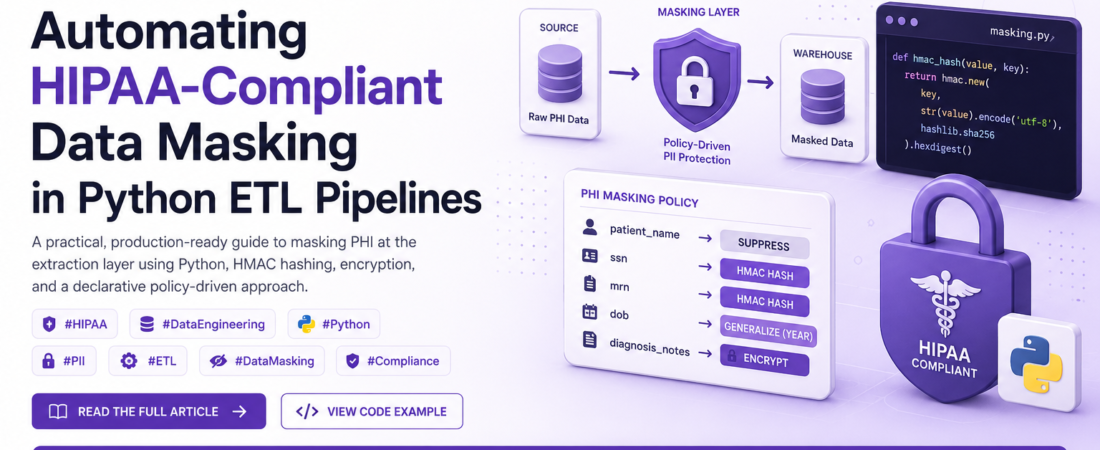
The solution I recommend is a masking-as-a-middleware pattern: intercept and transform PII at the extraction boundary, before it ever touches your pipeline’s internal storage.
Hashing vs. Encryption: Choosing the Right Technique
This is the question I get asked most often by engineers new to compliance work, and the answer isn’t as simple as “use one or the other.”
Hashing (One-Way, Irreversible)
Hashing transforms a value into a fixed-length digest. It’s deterministic — the same input always produces the same hash — but irreversible by design.
Best for: Patient identifiers, SSNs, MRNs where you need consistent joins across datasets but never need to recover the original value.
Watch out for: Using a weak, unsalted hash like plain MD5 or SHA-1. A rainbow table attack can reverse common values (e.g., SSNs are only 9 digits — there are only ~1 billion possibilities). Always use a keyed HMAC (e.g., HMAC-SHA256) with a secret key stored in a secrets manager, not hardcoded.
Encryption (Two-Way, Reversible)
Encryption transforms data in a way that can be reversed with the correct key.
Best for: Data that must be recoverable — e.g., when a clinical application needs to display original patient names to authorized users.
Watch out for: Key management. If you encrypt a column but store the key in the same database, you’ve solved nothing. Use a dedicated KMS (AWS KMS, GCP Cloud KMS, HashiCorp Vault).
Format-Preserving Encryption (FPE)
A specialized variant worth knowing: FPE (e.g., FF3-1) encrypts a value while preserving its format. A 10-digit phone number encrypted with FPE remains a 10-digit number. This is extremely useful when downstream systems validate field formats and you can’t change their schemas.
Building the Data Masking Layer in Python
Let me show you how I structure this in a real pipeline. The pattern uses a MaskingConfig object that defines per-field strategies, applied at the extraction stage.
Step 1: Dependencies and Setup
# requirements.txt
# cryptography>=41.0.0
# pandas>=2.0.0
# boto3>=1.28.0  # For AWS Secrets Manager

import hashlib
import hmac
import os
import json
import pandas as pd
from cryptography.fernet import Fernet
from typing import Literal
Step 2: Load Your Secret Key Securely
Never hardcode keys. In production, I pull them from AWS Secrets Manager. For local dev, I use environment variables loaded from a .env file that is never committed to git.
import boto3
from base64 import b64decode

def get_masking_key(secret_name: str, region: str = "us-east-1") -> bytes:
    """
    Fetch the masking key from AWS Secrets Manager.
    Falls back to env var for local development.
    """
    if os.getenv("ENV") == "local":
        key = os.environ.get("MASKING_SECRET_KEY")
        if not key:
            raise EnvironmentError("MASKING_SECRET_KEY not set for local dev.")
        return key.encode()

    client = boto3.client("secretsmanager", region_name=region)
    response = client.get_secret_value(SecretId=secret_name)
    secret = json.loads(response["SecretString"])
    return secret["masking_key"].encode()


MASKING_KEY = get_masking_key("hipaa/etl/masking-key")
Step 3: The Core Masking Functions
def hmac_hash(value: str, key: bytes) -> str:
    """
    Deterministic, keyed HMAC-SHA256 hash.
    Same input + same key = same output. Safe for joins.
    NOT reversible without the key.
    """
    if pd.isna(value) or value == "":
        return value  # Preserve nulls; don't hash them to a constant
    return hmac.new(key, str(value).encode("utf-8"), hashlib.sha256).hexdigest()


def encrypt_value(value: str, fernet: Fernet) -> str:
    """
    Symmetric Fernet encryption. Reversible with the key.
    Use for data that authorized systems may need to recover.
    """
    if pd.isna(value) or value == "":
        return value
    return fernet.encrypt(str(value).encode("utf-8")).decode("utf-8")


def decrypt_value(token: str, fernet: Fernet) -> str:
    """Decrypt a previously encrypted value."""
    if pd.isna(token) or token == "":
        return token
    return fernet.decrypt(token.encode("utf-8")).decode("utf-8")


def generalize_date(date_value, granularity: Literal["year", "month"] = "year") -> str:
    """
    HIPAA Safe Harbor: dates more specific than year must be masked
    for patients over 89. Generalizing to year is the safest default.
    """
    if pd.isna(date_value):
        return None
    ts = pd.to_datetime(date_value)
    if granularity == "year":
        return str(ts.year)
    elif granularity == "month":
        return ts.strftime("%Y-%m")


def suppress_value(_value) -> None:
    """Full suppression — replace with None. Use for direct identifiers
    that have no analytical value (e.g., phone numbers in a claims dataset)."""
    return None
Step 4: The Masking Config and Pipeline Orchestrator
This is the part I’m most proud of — a declarative config that separates policy from mechanics. When HIPAA rules change or a new field is added, you update the config, not the code.
from dataclasses import dataclass, field
from typing import Callable, Dict

@dataclass
class FieldMaskingPolicy:
    strategy: Literal["hmac_hash", "encrypt", "generalize_date", "suppress"]
    granularity: str = "year"  # Only used for generalize_date


# Declarative per-field PHI masking policy
PHI_MASKING_CONFIG: Dict[str, FieldMaskingPolicy] = {
    "patient_name":      FieldMaskingPolicy(strategy="suppress"),
    "ssn":               FieldMaskingPolicy(strategy="hmac_hash"),
    "mrn":               FieldMaskingPolicy(strategy="hmac_hash"),  # Medical Record Number
    "email":             FieldMaskingPolicy(strategy="hmac_hash"),
    "phone":             FieldMaskingPolicy(strategy="suppress"),
    "address":           FieldMaskingPolicy(strategy="suppress"),
    "zip_code":          FieldMaskingPolicy(strategy="generalize_date"),  # Repurposed for 3-digit truncation
    "dob":               FieldMaskingPolicy(strategy="generalize_date", granularity="year"),
    "admission_date":    FieldMaskingPolicy(strategy="generalize_date", granularity="month"),
    "diagnosis_notes":   FieldMaskingPolicy(strategy="encrypt"),
}


def apply_masking_pipeline(df: pd.DataFrame, config: Dict[str, FieldMaskingPolicy]) -> pd.DataFrame:
    """
    Apply the masking policy to a DataFrame at extraction time.
    Only masks columns that are present — safe to run on partial extracts.
    """
    fernet = Fernet(Fernet.generate_key())  # In production, derive from MASKING_KEY via KDF
    df = df.copy()  # Never mutate the input

    for col, policy in config.items():
        if col not in df.columns:
            continue  # Gracefully skip columns not in this extract

        if policy.strategy == "hmac_hash":
            df[col] = df[col].apply(lambda v: hmac_hash(v, MASKING_KEY))

        elif policy.strategy == "encrypt":
            df[col] = df[col].apply(lambda v: encrypt_value(v, fernet))

        elif policy.strategy == "generalize_date":
            df[col] = df[col].apply(
                lambda v: generalize_date(v, granularity=policy.granularity)
            )

        elif policy.strategy == "suppress":
            df[col] = df[col].apply(suppress_value)

    return df
Step 5: Wiring It Into Your ETL
Here’s how this looks in a real extraction step — PostgreSQL source, masked in memory, loaded to a data warehouse:
import sqlalchemy as sa

def extract_and_mask(engine: sa.Engine, query: str) -> pd.DataFrame:
    """
    Extract raw PHI from source, apply masking immediately.
    The raw DataFrame is never written to disk or logged.
    """
    with engine.connect() as conn:
        raw_df = pd.read_sql(query, conn)

    print(f"[ETL] Extracted {len(raw_df)} rows. Applying PHI masking...")
    masked_df = apply_masking_pipeline(raw_df, PHI_MASKING_CONFIG)

    # Audit log — log the schema and row count, NEVER the data
    print(f"[ETL] Masking complete. Columns processed: {list(masked_df.columns)}")
    return masked_df


def load_to_warehouse(df: pd.DataFrame, target_table: str, engine: sa.Engine) -> None:
    """Load masked data to the analytics warehouse."""
    df.to_sql(target_table, engine, if_exists="append", index=False, method="multi")
    print(f"[ETL] Loaded {len(df)} rows into {target_table}.")


# --- Main pipeline entrypoint ---
if __name__ == "__main__":
    source_engine = sa.create_engine(os.environ["SOURCE_DB_URL"])
    warehouse_engine = sa.create_engine(os.environ["WAREHOUSE_DB_URL"])

    PATIENT_QUERY = """
        SELECT patient_name, ssn, mrn, email, phone,
               address, zip_code, dob, admission_date, diagnosis_notes
        FROM patients
        WHERE updated_at > NOW() - INTERVAL '1 day'
    """

    masked = extract_and_mask(source_engine, PATIENT_QUERY)
    load_to_warehouse(masked, "masked_patients", warehouse_engine)
Pro-Tips That Save You in Audits
These are the things no compliance checklist tells you, but every auditor will ask about:
- Log masking events, not masked data. Write audit logs that capture which fields were masked, which policy was applied, and when — never the before/after values.
- Test that masking is idempotent. Running the pipeline twice on the same record should produce the same masked output (deterministic hashing enables this). Write a unit test for it.
- Handle schema drift. Source systems change. Add a step that checks for new columns matching PII patterns (e.g., any column named
*_ssn,*_email,*_dob) and raises an alert if they appear in an extract without a defined masking policy. - Never log DataFrames. A
print(df.head())in a prod log pipeline is a HIPAA violation waiting to happen. Use structured logging with explicit field whitelists. - The ZIP code edge case. Under HIPAA Safe Harbor, 3-digit ZIP code prefixes covering fewer than 20,000 people must be suppressed entirely. If you’re generalizing ZIPs, validate against the HIPAA ZIP code reference list.
Performance Considerations
One concern I hear often: “Won’t masking every row in Python be slow?”
For small-to-medium datasets (under 5M rows), the vectorized apply() approach above is fast enough. For larger volumes, consider:
- Vectorized HMAC with
numpy: Batch-hash arrays instead of row-by-row. - Dask or Polars for the transformation layer (more on Polars in our next post).
- Push masking to the database using stored procedures or column masking policies (Snowflake Dynamic Data Masking, for example) — this avoids pulling raw PHI into application memory at all.
Conclusion: Compliance Is an Engineering Problem
HIPAA compliance in ETL isn’t about checking boxes — it’s about designing a system where it’s impossible to accidentally expose PHI. The pattern I’ve outlined here — declarative masking config, secrets manager integration, audit logging, and masking at the extraction boundary — gives you that guarantee.
The investment pays off fast. When the next compliance audit comes around, instead of scrambling to explain your data flows, you hand the auditor a config file and a test suite. That’s a very different conversation.
Start with the fields you know are PHI. Build the config. Ship the tests. Compliance debt compounds just like technical debt — the sooner you pay it down, the cheaper it gets.