
Meta description: Passei horas rastreando Next.js hydration errors em produção. Veja como diagnostico e corrijo rapidamente — incluindo as armadilhas que mais me custaram tempo.
Last updated: June 2026
Introduction
I still remember the first time I saw this error in my Next.js app:
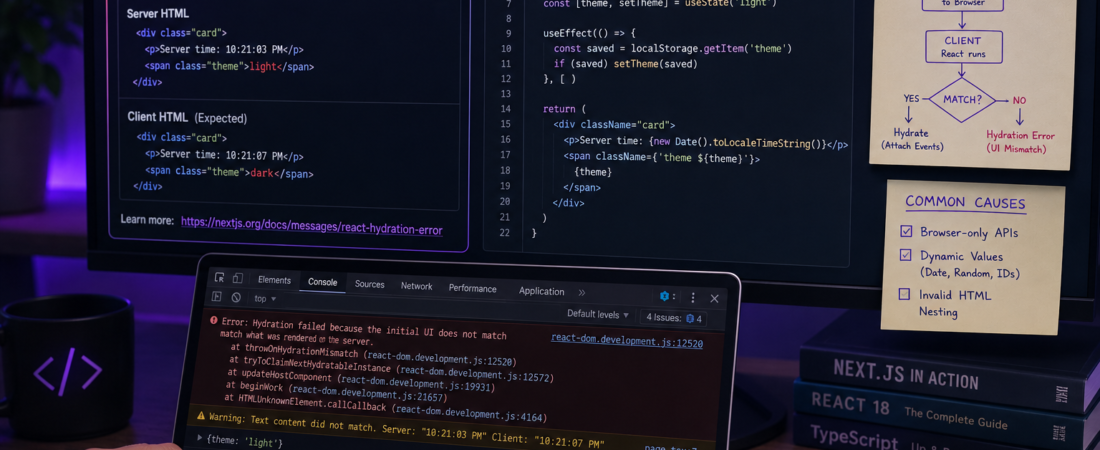
“Error: Hydration failed because the initial UI does not match what was rendered on the server.”
It was 11pm, the feature was supposed to ship the next morning, and I had no idea where to start. The stack trace was useless, the component tree looked fine, and reloading the page made it disappear — only to come back in production. Sound familiar?
Next.js hydration errors are one of the most frustrating issues in modern React development. They’re subtle, inconsistent, and can come from a dozen different places. In this article, I’ll walk you through exactly how I diagnose and fix them, based on real bugs I’ve encountered in production apps.
TL;DR
- Hydration errors happen when server-rendered HTML doesn’t match what React renders on the client.
- The most common causes are: browser-only APIs, dynamic content (dates, random values), and invalid HTML nesting.
- Use
suppressHydrationWarning, dynamic imports withssr: false, oruseEffectto safely handle client-only content.
Why Next.js Hydration Errors Happen — And Why They’re So Hard to Catch
Hydration is the process where React “attaches” to the static HTML the server already rendered. React runs the same component code on the client and expects to produce identical output. If there’s a mismatch, it throws.
This is a feature, not a bug — it’s React protecting you from UI inconsistencies. But it means you have to be very deliberate about what runs where.
[SOURCE: https://react.dev/reference/react-dom/client/hydrateRoot]
The tricky part in Next.js is that your components run in two environments: Node.js on the server, and the browser on the client. Anything that differs between those two — window, localStorage, Date.now(), random values, user-specific data — is a potential hydration mine.
Prerequisites
Before diving in, make sure you have:
- Next.js 13+ (App Router or Pages Router — I’ll cover both)
- React 18
- Access to your browser’s DevTools console
- Familiarity with React component lifecycle and
useEffect
Step-by-Step: How I Debug Next.js Hydration Errors
Step 1: Read the Full Error Message in Development
In development mode, Next.js gives you a detailed overlay with the mismatched HTML. Don’t skip this — it tells you exactly what the server rendered vs. what the client expected.
# Run in development mode to get full error overlays
npm run dev
Look for lines like:
Expected server HTML to contain a matching <div> in <div>.
or:
Warning: Prop `className` did not match. Server: "dark" Client: "light"
These tell you the exact element and prop that mismatched.
Step 2: Identify the Source — Browser-Only APIs
The most common cause I’ve seen is accessing window, navigator, or localStorage directly in a component body. These don’t exist in Node.js.
// ❌ This causes a hydration error
const MyComponent = () => {
  const theme = localStorage.getItem('theme'); // window.localStorage is undefined on server
  return <div className={theme}>Hello</div>;
};
// ✅ Fix: move it into useEffect
const MyComponent = () => {
  const [theme, setTheme] = useState('light');

  useEffect(() => {
    const saved = localStorage.getItem('theme');
    if (saved) setTheme(saved);
  }, []);

  return <div className={theme}>Hello</div>;
};
Step 3: Fix Dynamic Content (Dates, Random IDs, User Data)
The second most common culprit in my experience is rendering content that changes between server and client. new Date() on the server runs at request time; on the client, it runs at render time — and they’re different.
// ❌ Server and client return different timestamps
const Timestamp = () => <p>Rendered at: {new Date().toLocaleTimeString()}</p>;
// ✅ Fix: render it only on the client
const Timestamp = () => {
  const [time, setTime] = useState('');
  useEffect(() => setTime(new Date().toLocaleTimeString()), []);
  return <p>Rendered at: {time}</p>;
};
Step 4: Fix Invalid HTML Nesting
This one surprised me the first time. The browser silently “fixes” invalid HTML before React sees it, causing a mismatch. Classic example: a <p> tag wrapping a <div>.
// ❌ Invalid HTML — browsers move the <div> outside the <p>
const Card = () => (
  <p>
    <div>Content</div>
  </p>
);
// ✅ Fix: use valid nesting
const Card = () => (
  <div>
    <div>Content</div>
  </div>
);
Use the W3C Validator or browser DevTools Elements tab to spot these quickly.
Step 5: Use Dynamic Imports for Client-Only Components
When an entire component should never run on the server, dynamic imports with ssr: false are your best friend. I use this for chart libraries, map components, and anything touching the DOM directly.
import dynamic from 'next/dynamic';

const MapComponent = dynamic(() => import('./Map'), {
  ssr: false,
  loading: () => <p>Loading map...</p>,
});
This tells Next.js to skip server-rendering that component entirely, so there’s nothing to hydrate — and no mismatch.
Step 6: Use suppressHydrationWarning for Intentional Differences
Sometimes you know the content will differ (e.g., a timestamp, an ad, a third-party widget) and that’s acceptable. React provides an escape hatch:
<time suppressHydrationWarning>{new Date().toISOString()}</time>
Important: Use
suppressHydrationWarningsparingly. It hides the warning but doesn’t fix the underlying mismatch. Only use it when the difference is truly intentional and harmless. Overusing it will mask real bugs.
Real-World Tips I Use in Production
With the step-by-step covered, here are the shortcuts I rely on daily to prevent hydration errors before they happen.
Tip 1: Create an isClient hook. I keep this utility in every Next.js project I build:
// hooks/useIsClient.ts
import { useState, useEffect } from 'react';

export function useIsClient() {
  const [isClient, setIsClient] = useState(false);
  useEffect(() => setIsClient(true), []);
  return isClient;
}
Then wrap any client-only rendering: if (!isClient) return null;
Tip 2: Check your third-party libraries. In my experience, hydration errors introduced by npm packages are incredibly common. Libraries like react-select, react-quill, or any component that accesses document internally will blow up if SSR’d. Always check their docs for SSR compatibility before installing.
Tip 3: Test with NODE_ENV=production. Next.js suppresses some hydration warnings in development. Running npm run build && npm start reveals errors that only appear in production builds.
[SOURCE: https://nextjs.org/docs/messages/react-hydration-error]
Common Errors and How I Fixed Them
Even with a solid checklist, some errors are sneaky. Here are three that cost me the most time.
Error: “Text content does not match server-rendered HTML.” Cause: A translation library (like next-i18next) was loading a different locale on server vs. client. Fix: Ensured the locale was passed via getServerSideProps so both environments agreed.
Error: “Expected server HTML to contain a matching <div> in <body>.” Cause: A browser extension was injecting a DOM node before React hydrated. Fix: Not a code bug — told the team to test in an incognito window. Still worth knowing.
Error: className mismatch with CSS-in-JS libraries. Cause: Libraries like styled-components or Emotion generate class names dynamically. Without server-side setup, they generate different names on server and client. Fix: Added ServerStyleSheet for styled-components per their SSR docs, or switched to @emotion/server.
FAQ
Why do Next.js hydration errors only appear in production and not in development?
Next.js development mode suppresses some hydration warnings and uses a less strict rendering pipeline. Production builds use the full React hydration check, which catches mismatches that dev mode lets slide. Always test with npm run build && npm start before deploying.
How do I find which component is causing a Next.js hydration error when the stack trace is unhelpful?
Add console.log statements at the top of suspected components to log their render environment (typeof window !== 'undefined'). You can also temporarily remove sections of your page tree until the error disappears — binary search your component tree.
Can I disable hydration for an entire Next.js page?
Yes. With the App Router, you can export export const dynamic = 'force-dynamic' or render the page only on the client by wrapping everything in a useEffect. With Pages Router, use getServerSideProps carefully or avoid SSR by exporting only client-side logic. For a fully client-rendered page, dynamic with ssr: false at the page level works.
Why does suppressHydrationWarning not work for all hydration mismatches?
suppressHydrationWarning only works on the specific element it’s applied to, and only for attribute/text differences — not structural mismatches. If the server renders a <div> and the client expects a <span>, React can’t reconcile that, and suppression won’t help.
How do Next.js hydration errors affect SEO and Core Web Vitals?
Hydration errors cause React to re-render the entire subtree from scratch on the client, which can significantly delay Time to Interactive (TTI) and Largest Contentful Paint (LCP). This directly impacts your Core Web Vitals score. Fixing hydration errors is not just a DX win — it’s an SEO and performance win too.
Conclusion
Next.js hydration errors feel mysterious at first, but once you understand why they happen — server/client environment differences — they become very predictable. The pattern is almost always the same: something runs differently in Node.js than in the browser.
My go-to debugging order: check browser-only APIs → check dynamic content → check HTML nesting → isolate with dynamic imports. Follow those four steps and you’ll fix 95% of hydration errors in minutes.
If this post helped you, share it with your team or drop a comment below — I’d love to know which hydration bug you were dealing with and how you fixed it.
About the Author
I’m a senior full-stack engineer with 9 years of experience building production web apps, with the last four focused almost entirely on the React and Next.js ecosystem. My primary stack is TypeScript, Next.js, Prisma, and PostgreSQL. I’ve debugged more hydration errors than I care to count — mostly my own fault — and I write about the lessons so other developers don’t have to learn them the hard wa