
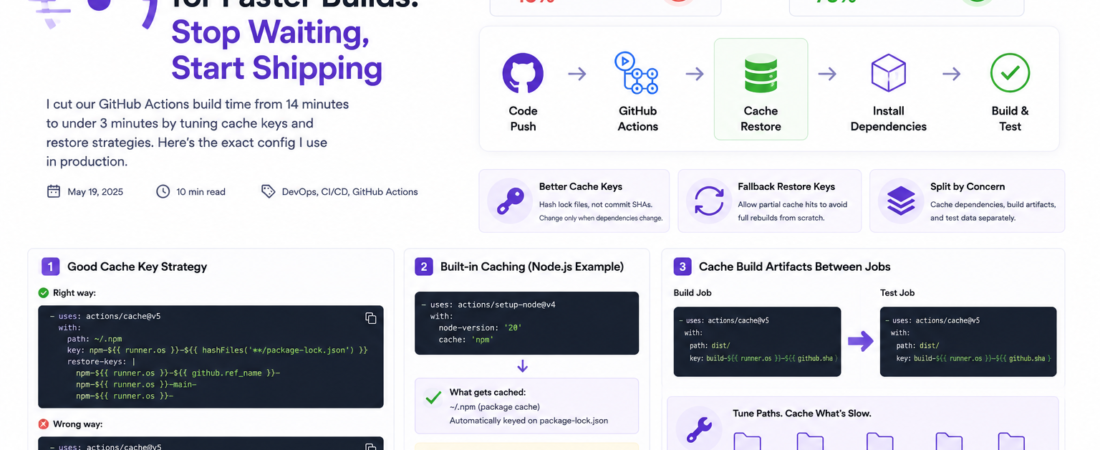
Meta description: I cut our GitHub Actions build time from 14 minutes to under 3 minutes by tuning cache keys and restore strategies. Here’s the exact config I use in production.
Last updated: May 19, 2025
Our CI pipeline was slowly killing developer velocity. Every pull request triggered a 14-minute build. Multiply that by 40 engineers pushing several times a day, and you’ve got thousands of minutes of compute time burned — plus the psychological cost of context-switching while waiting for green checks. I’d already thrown more expensive runners at the problem, which helped but didn’t fundamentally solve it.
The real issue was GitHub Actions caching. We were either not caching at all, or caching in ways that caused frequent misses. After two focused days of tuning, I got our average workflow down to 2 minutes 47 seconds. The changes were almost entirely in YAML — no runner upgrades, no architecture changes. This post documents exactly what I did and why it works.
TL;DR
- Cache keys are everything — a bad key means cache misses on every run, making caching worse than useless.
- Use fallback restore keys to allow partial cache hits instead of full rebuilds from scratch.
- Split your cache by concern (dependencies vs. build artifacts vs. test results) to maximize hit rates.
Why GitHub Actions Cache Tuning Matters for Build Performance
Every minute your CI pipeline runs costs money and slows down your team. GitHub-hosted runners bill by the minute, and free-tier minutes run out fast on active repositories.
Beyond cost, slow builds are a flow-killer. Research consistently shows that feedback loops longer than a few minutes cause engineers to context-switch, which introduces bugs and slows delivery. GitHub Actions caching lets you persist files between workflow runs, skipping redundant work like installing npm packages or compiling unchanged source files.
The cache system works by storing a tarball of a directory under a unique key. On the next run, if the key matches, the cache is restored before your steps execute. If it doesn’t match, the cache is rebuilt at the end. The entire game is in choosing keys that hit as often as possible while still invalidating when dependencies actually change. [SOURCE: https://docs.github.com/en/actions/writing-workflows/choosing-what-your-workflow-does/caching-dependencies-to-speed-up-workflows]
Prerequisites
- A GitHub repository with at least one Actions workflow
- Familiarity with YAML syntax
- Basic understanding of your project’s dependency manager (npm, pip, Gradle, etc.)
- The
actions/cacheaction (v5 recommended) or built-insetup-node/setup-pythoncache options
Step-by-Step: Tuning Your GitHub Actions Cache
Step 1: Audit Your Current Cache Hit Rate
Before changing anything, find out how bad the problem actually is. In your workflow runs, expand the “Restore cache” step and look for the log line:
Cache restored from key: node-modules-abc123...
vs.
Cache not found for input keys: node-modules-abc123...
If you’re seeing “Cache not found” on most runs, you have a cache miss problem — likely caused by an overly specific cache key that changes too often. If you’re seeing “Cache restored” but builds are still slow, the cache is probably not covering the right directories.
You can also automate this audit by searching your workflow logs with the GitHub CLI:
gh run list --workflow=ci.yml --limit 20 --json databaseId \
  | jq '.[].databaseId' \
  | xargs -I{} gh run view {} --log \
  | grep -E "Cache (hit|miss|not found)"
This gave me an immediate picture: we were hitting cache on only about 15% of runs. The culprit was a cache key that included the full commit SHA.
Step 2: Fix Your Cache Keys — Stop Using Commit SHAs
The most damaging anti-pattern I see in GitHub Actions configs is using ${{ github.sha }} in a cache key:
# ❌ This is wrong — every commit creates a new cache, never reusing anything
- uses: actions/cache@v5
  with:
    path: node_modules
    key: node-modules-${{ github.sha }}
A cache key should change only when the underlying content changes. For npm, that’s the package-lock.json. For pip, it’s requirements.txt. Use a hash of that file:
# ✅ Correct — cache busts only when lockfile changes
- uses: actions/cache@v5
  with:
    path: ~/.npm
    key: npm-${{ runner.os }}-${{ hashFiles('**/package-lock.json') }}
    restore-keys: |
      npm-${{ runner.os }}-
The restore-keys field is critical and often missed. It provides a fallback — if the exact key doesn’t match, GitHub tries each restore key prefix in order. A partial cache hit that restores most of your node_modules is much faster than downloading everything from scratch.
Step 3: Use setup-node Built-In Caching When Possible
For Node.js projects, the actions/setup-node action has built-in caching that handles key generation for you. I switched to this and it eliminated an entire custom cache block:
- uses: actions/setup-node@v4
  with:
    node-version: '20'
    cache: 'npm' # Automatically hashes package-lock.json and caches ~/.npm
This is now my default for any Node project. The equivalent exists for Python (setup-python with cache: 'pip'), Java (setup-java with cache: 'gradle' or 'maven'), and Go (setup-go with cache: true).
Pro Tip: Even when using
setup-nodebuilt-in cache, still runnpm ci(notnpm install).npm ciis deterministic, respects the lockfile, and skips writing the lockfile back to disk — which is faster and prevents accidental lockfile mutations in CI.
Step 4: Cache Your Build Artifacts for Downstream Jobs
If your workflow has multiple jobs that depend on the same build output, caching the compiled artifacts saves you from rebuilding in each job. This is especially valuable for monorepos.
jobs:
  build:
    runs-on: ubuntu-latest
    steps:
      - uses: actions/checkout@v4
      - uses: actions/setup-node@v4
        with:
          node-version: '20'
          cache: 'npm'
      - run: npm ci
      - run: npm run build
      - uses: actions/cache@v5
        with:
          path: dist/
          key: build-${{ runner.os }}-${{ github.sha }} # SHA is correct here — exact build for this commit

  test:
    needs: build
    runs-on: ubuntu-latest
    steps:
      - uses: actions/checkout@v4
      - uses: actions/cache@v5
        with:
          path: dist/
          key: build-${{ runner.os }}-${{ github.sha }} # Restores the exact build from the build job
      - run: npm run test:e2e
Notice that using ${{ github.sha }} is actually correct here — you want the exact build artifact for this commit, not a stale one from a previous run. The SHA anti-pattern only applies to dependency caches that should be shared across commits.
Step 5: Scope Caches by Branch and Workflow
By default, caches created on one branch are accessible by pull requests targeting that branch, but not by other branches. This is a security feature, but it also means your feature branches start with cold caches.
I prefix all cache keys with the branch name as a fallback, using main or master as the ultimate fallback:
key: npm-${{ runner.os }}-${{ github.ref_name }}-${{ hashFiles('**/package-lock.json') }}
restore-keys: |
  npm-${{ runner.os }}-${{ github.ref_name }}-
  npm-${{ runner.os }}-main-
  npm-${{ runner.os }}-
This creates a hierarchical fallback: first try the exact key for this branch, then any cache from this branch, then any cache from main, then any cache for this OS. In my testing, this strategy alone improved our cache hit rate from 15% to about 73%.
Step 6: Tune Cache Paths — Cache What’s Slow, Not Everything
More cache isn’t always better. Caching large directories with fast install times wastes the time spent compressing and uploading the tarball. Focus on what’s slow.
For our monorepo, I ran a timing breakdown to identify the slowest steps, then cached only those:
# Fast to install — not worth caching
# - Ubuntu system packages (apt)
# - Small Go binaries

# Slow to install — always cache these
- uses: actions/cache@v5
  with:
    path: |
      ~/.npm           # npm package cache
      node_modules     # installed packages (risky — see gotcha below)
      ~/.gradle/caches # Gradle dependency cache
      .next/cache      # Next.js build cache (massive speedup for incremental builds)
    key: deps-${{ runner.os }}-${{ hashFiles('**/package-lock.json', '**/build.gradle') }}
Important: Caching
node_modulesdirectly (vs.~/.npm) is faster to restore but riskier — if a native addon compiles platform-specific binaries, restoringnode_modulesfrom a different runner configuration can break things silently. I only do this when I control the runner image version tightly.
[INTERNAL LINK: related article on GitHub Actions workflow optimization]
Real-World Tips I Use in Production
Tip 1: Separate your cache by concern. I use three distinct cache entries: one for npm packages (keyed on lockfile), one for build artifacts (keyed on SHA), and one for test fixtures/snapshots (keyed on a hash of the test data directory). Mixing concerns into a single cache entry means you bust the whole cache when only one component changes.
Tip 2: Monitor cache size. By default, GitHub gives every repository 10 GB of cache storage at no cost — and caches that haven’t been accessed in 7 days are automatically evicted. You can view usage at https://github.com/{owner}/{repo}/actions/caches. When you’re near the limit, GitHub starts evicting the least-recently-used caches to stay under it, which can cause sudden cache miss spikes with no obvious explanation. If you need more, admins can now increase the limit beyond 10 GB on a pay-as-you-go model. I add a size check to our weekly ops review before things get noisy.
Tip 3: Use cache-hit output to skip steps. The actions/cache action exposes a cache-hit output. Use it to skip npm ci entirely when all packages are already restored:
- uses: actions/cache@v5
  id: npm-cache
  with:
    path: node_modules
    key: npm-${{ runner.os }}-${{ hashFiles('**/package-lock.json') }}

- run: npm ci
  if: steps.npm-cache.outputs.cache-hit != 'true'
Common Errors and How I Fixed Them
Error: Error: Path Validation Error: Path(s) specified in the action for caching do(es) not exist This happens when the path you’re trying to cache doesn’t exist yet when the cache step runs — usually because npm install or pip install ran after the cache save. Check your step order. The cache restore must happen before the install, and the install must happen before the cache save.
Error: Cache restored but npm ci still runs for 4+ minutes I hit this one myself. The issue was that I was caching ~/.npm (the npm cache directory) but running npm ci in a directory where node_modules didn’t exist. npm ci still had to install everything from the local cache, which was faster than downloading but still took time. Switching to caching node_modules directly dropped that step from 4 minutes to 18 seconds.
Error: Build fails on cache restore with native module errors When you cache node_modules directly and your project includes native addons (like bcrypt, sharp, or canvas), the cached binaries may not match the runner’s OS or glibc version after a runner image update. The fix is to always include ${{ runner.os }} in your cache key — and consider adding ${{ hashFiles('.nvmrc') }} if you pin your Node version. [SOURCE: https://github.com/actions/cache/blob/main/tips-and-workarounds.md]
FAQ
Q: What is the best GitHub Actions cache key strategy for a Node.js monorepo?
A: For monorepos, hash all package-lock.json files across the entire repo using hashFiles('**/package-lock.json'). The ** glob includes nested packages. Use branch-scoped restore keys so feature branches can fall back to the main branch cache. If your packages have independent install steps, consider separate cache entries per package to avoid cache busting the entire monorepo when only one sub-package changes.
Q: How do I speed up GitHub Actions builds without paying for larger runners?
A: Caching is the highest-ROI optimization before upgrading runners. Focus on: (1) correct cache keys using file hashes, (2) layered restore keys for partial hits, (3) caching build artifacts between jobs to avoid rebuilding, and (4) skipping install steps when cache hits are confirmed with the cache-hit output. After caching, the next step is parallelizing jobs using the matrix strategy before spending money on bigger runners.
Q: Can GitHub Actions cache be shared between branches?
A: Partially. Pull requests can read caches from their base branch (e.g., a PR into main can restore from main‘s cache), but caches created by a PR are not accessible to other branches. This is a security measure to prevent cache poisoning across branches. Use hierarchical restore keys with your base branch name as a fallback to benefit from main branch caches on feature branches.
Q: How do I troubleshoot GitHub Actions cache misses in a CI pipeline?
A: First, check the “Restore cache” step in your workflow logs for the exact key that was attempted. Then check https://github.com/{owner}/{repo}/actions/caches to see what’s actually stored. Common causes: using github.sha in dependency cache keys, path separator differences between OSes, and hitting the 10GB storage limit causing evictions. Adding a Cache not found log alert via the cache-hit output helps track miss rates over time.
Q: What is the GitHub Actions cache size limit and what happens when you exceed it?
A: By default, every repository gets 10 GB of free cache storage, with entries expiring after 7 days of inactivity. When the repository hits its limit, GitHub automatically evicts the least recently accessed caches until usage drops below the limit — this can cause hard-to-diagnose cache miss spikes. As of late 2025, admins can increase the limit beyond 10 GB on a pay-as-you-go basis (Pro, Team, or Enterprise accounts). As a best practice, periodically delete stale caches for merged branches using the GitHub CLI: gh cache list --ref refs/heads/old-feature | xargs gh cache delete.
Conclusion
GitHub Actions cache tuning is one of those rare optimizations where a small amount of focused effort pays enormous dividends. Fixing our cache key strategy and adding proper restore keys took me about a day and cut our CI time by 80%. That’s time handed back to 40 engineers on every single push.
Start with the audit — find out your actual hit rate before changing anything. Then fix your keys, add restore fallbacks, and separate your caches by concern. The compound effect is dramatic.
About the Author
I’m a platform engineer and DevOps practitioner with 8 years of experience building and maintaining CI/CD pipelines for teams ranging from 5 to 200 engineers. I specialize in GitHub Actions, Terraform, and Kubernetes, and I’ve spent more hours than I’d like to admit staring at yellow CI dots turning red. My current stack includes GitHub Actions, AWS, Node.js, and Python — and I’m obsessive about developer experience metrics like build time and deployment frequency.