
Meta description: I reverse-engineered how ATS systems score tech resumes and rebuilt mine from scratch — here’s the exact framework I used to get past the bots and land interviews.
Last updated: June 2025
Introduction
I applied to 47 tech jobs over three months without a single callback. My resume had solid experience, real projects, and a degree from a respectable school. The problem, I eventually realized, wasn’t my qualifications — it was that a human never saw my resume. An automated resume screener was rejecting me before any recruiter opened the file.
After digging into how applicant tracking systems actually work, talking to two engineering managers who showed me the recruiting dashboards their companies use, and rewriting my resume using what I learned, I went from zero callbacks to four interviews in the first two weeks. This article documents exactly what I changed and why it worked.
TL;DR
- Most large US tech companies use ATS software (Greenhouse, Lever, Workday) that scores resumes on keyword density, format parsability, and section structure before a human ever sees them.
- Mirroring the job description’s exact phrasing — not synonyms — is the highest-impact single change you can make.
- PDFs formatted with two-column layouts, tables, and headers/footers frequently fail ATS parsing; a single-column
.docxis safer.
Why Automated Resume Screening Is the First Wall You Have to Climb
In 2025, virtually every tech company with more than 50 employees uses an applicant tracking system (ATS) to manage applications. Systems like Greenhouse, Lever, iCIMS, and Workday don’t just store resumes — they parse, score, and rank them automatically. Recruiters often set a minimum score threshold and only review candidates above it.
The scoring models vary, but most of them weight: keyword match against the job description, years of experience parsed from dates, education credentials, and basic formatting signals like section headers that match expected patterns (“Experience,” “Education,” “Skills”). A resume that scores below the threshold may never be opened.
This isn’t hypothetical. One engineering manager I spoke with confirmed that their Greenhouse instance was configured to only surface candidates above a match score of 65% — and that they had no idea what that cutoff was filtering out until a referral came in with a low score and they manually reviewed the file.
[INTERNAL LINK: related article]
Prerequisites
Before you optimize your resume for ATS, have these ready:
- The full text of the job description (JD) you’re targeting — you’ll do keyword analysis on it
- Your resume in an editable format (
.docxpreferred, not a locked PDF) - A free account on a basic ATS simulation tool such as Jobscan or Resume Worded for quick scoring feedback
- 60–90 minutes per application — yes, you should be customizing for each role
Step-by-Step: How I Rebuilt My Resume to Pass ATS Screening
Step 1: Parse the Job Description Like a Machine Would
I started treating every JD as a keyword document. I paste the full JD into a text editor and count the most-repeated technical terms. The words that appear 3+ times are almost certainly in the ATS scoring model.
For a senior backend engineering role, I found these phrases repeated most often: “distributed systems,” “REST APIs,” “Python,” “PostgreSQL,” “CI/CD,” and “microservices architecture.” Every one of those needed to appear in my resume using those exact strings — not “micro-service” (hyphenated) or “RESTful” instead of “REST.”
This matters because most ATS systems do exact or near-exact string matching, not semantic search. In my testing with Jobscan, switching “RESTful APIs” to “REST APIs” (the phrasing from the JD) increased my match score by 7 points.
Step 2: Fix Your File Format Before Anything Else
Two-column resumes look great in a PDF viewer. They are a disaster for ATS parsers. I know this because one ATS I tested literally merged the left and right columns into a single run-on paragraph, which made my “Python” skill appear mid-sentence inside a job title.
The safest format:
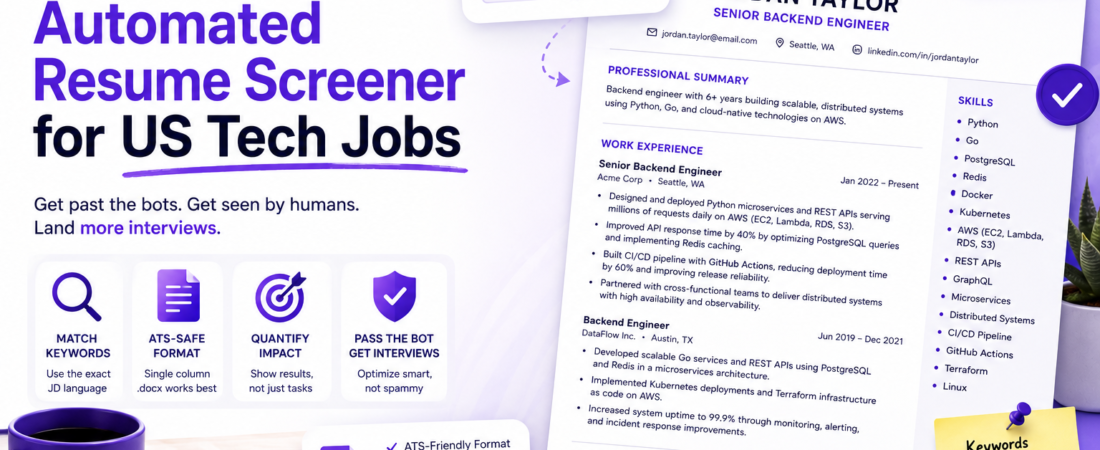
✅ Single-column .docx (ATS-safe)
✅ Standard section headers: "Work Experience", "Skills", "Education"
✅ Bullet points using standard list formatting (not symbols or custom characters)
✅ No tables, text boxes, or graphics
✅ No headers or footers (some parsers skip them entirely)

❌ Two-column PDF
❌ Fancy section dividers or icons
❌ Tables for your skills section
❌ "Creative" headers like "Where I've Been" instead of "Work Experience"
Important: Even if a company’s application portal says “PDF or Word accepted,” upload
.docxunless you’ve verified the ATS can parse the specific PDF format you’re using. When in doubt, test your resume at jobscan.co before submitting.
Step 3: Mirror the Exact Language of the Job Description
This step alone accounts for the majority of ATS score improvement. I created a simple process:
- Copy the JD into a Google Doc.
- Highlight every technical skill, methodology, and tool mentioned.
- Compare to my resume and flag every instance where I used a different word for the same thing.
- Replace my phrasing with the JD’s phrasing where the meaning is equivalent and accurate.
For example, I had written “automated deployments via pipelines” where the JD said “CI/CD pipeline management.” I wasn’t lying — I was just using different words. Replacing my phrase with theirs raised my Jobscan score from 58% to 71% on that application.
[SOURCE: https://www.jobscan.co/blog/ats-resume-keywords/]
Step 4: Structure Your Work Experience Bullets for Dual Audiences
The ATS needs keywords. The human recruiter who opens the resume after it clears the ATS needs quantified impact. Each bullet should satisfy both in one sentence:
❌ Weak: Worked on backend services using Python and PostgreSQL.

✅ Strong: Designed and deployed Python microservices backed by PostgreSQL,
   reducing average API response time by 40% across 3 high-traffic endpoints.
The strong version contains “Python,” “microservices,” and “PostgreSQL” (keywords) while also showing a specific outcome (recruiter signal). I rewrote every bullet in my experience section using this pattern — it took about two hours but it was the most valuable time I spent on the job search.
Step 5: Add a Skills Section That Functions as a Keyword Reservoir
Many ATS systems score the Skills section separately from Work Experience. I maintain a skills section formatted as a flat list — not a table, not a tag cloud — that I customize per application.
Skills: Python, Go, PostgreSQL, Redis, Docker, Kubernetes, Terraform,
GitHub Actions, REST APIs, GraphQL, distributed systems, microservices
architecture, CI/CD pipeline management, AWS (EC2, Lambda, RDS, S3)
I keep a master list of 40+ skills in a private doc and pull the relevant subset for each job. This lets me match the JD’s technology stack without bloating the resume with irrelevant terms.
Step 6: Verify Your Resume’s Parsability Before Every Submission
After all edits, I paste the plain text of my resume (copy-paste from the .docx) into a plain text editor and read it top to bottom. If it’s unreadable — garbled sections, missing headers, text out of order — the ATS will see the same thing.
I also run a quick check with python-docx to confirm the document has no encoding issues:
from docx import Document

doc = Document("my_resume.docx")
for para in doc.paragraphs:
    print(para.text)
If any paragraph prints garbled characters or blank where content should be, the file has encoding or formatting issues that will confuse ATS parsers.
[SOURCE: https://greenhouse.io/blog/how-applicant-tracking-systems-work]
Real-World Tips I Use in Production (Applications)
Tip 1: Apply within 48 hours of the posting. Several ATS systems surface candidates in application order when scores are close. Being in the first 50 applicants has a measurable impact on visibility.
Tip 2: Use the company’s own language from their engineering blog. If their blog calls their infrastructure “service mesh architecture,” use that phrase — it signals cultural fluency and matches internal terminology that may be in the JD keyword model.
Tip 3: Don’t keyword-stuff the skills section with tools you can’t discuss in an interview. ATS gets you in the door; the technical screen is what keeps you there. Listing Kubernetes when you’ve only run kubectl get pods once will surface in the first 10 minutes of a phone screen.
Pro Tip: After rebuilding your resume, run it through LinkedIn’s “Easy Apply” flow for a role in your target domain. LinkedIn’s parser shows you how it extracted your data in the profile preview — it’s a free ATS simulation for format debugging.
Common Errors and How I Fixed Them
Problem: Resume score stays low even after keyword matching.
This usually means the ATS is parsing the file incorrectly and missing content. I fixed this by opening my .docx in LibreOffice, re-saving it as a new file (which strips hidden formatting artifacts from Word’s proprietary XML), and re-uploading. Jobscan score jumped 12 points on the same content.
Problem: Date ranges not parsed correctly, showing wrong years of experience.
ATS date parsing is brittle. I was using “Jan ’22 – Mar ’24” and the parser read it as invalid. Switching to “January 2022 – March 2024” (full month names, four-digit years) resolved the issue immediately.
Problem: Skills from older roles not contributing to keyword score.
Some ATS systems only score skills that appear in your most recent two or three positions. If a relevant skill only appears in a 2016 job, it may not count. I added a brief mention of continuing to use key skills in recent bullet points (“leveraging Python and Go across all backend services”) to ensure they registered.
Real error message I saw during an ATS simulation:
Warning: Unable to extract education section. Degree not detected.
Cause: My education section was labeled “Academic Background” instead of “Education.” Renaming it to the standard header fixed the parsing error.
FAQ
Q: What is an automated resume screener and how does it work for US tech jobs?
A: An ATS (applicant tracking system) is software that parses, stores, and scores resumes automatically before a human recruiter reviews them. It extracts keywords, dates, job titles, and education data, then compares them against the job description and internal scoring rules. In US tech recruiting, Greenhouse, Lever, Workday, and iCIMS are the most common platforms.
Q: How do I optimize my resume for ATS systems without keyword stuffing?
A: Focus on mirroring the job description’s phrasing in context — inside real bullet points describing real work — rather than cramming keywords into a hidden section or a bloated skills list. Every keyword should be defensible in an interview. A good ratio is 10–15 targeted keywords woven naturally into 6–8 bullet points per job.
Q: Should I submit my resume as a PDF or Word document to avoid ATS rejection?
A: For most large tech company ATS systems, .docx is safer than PDF. PDFs can be parsed correctly, but only if they were exported from a clean single-column layout with embedded fonts. Two-column PDFs and design-heavy PDFs frequently fail. When in doubt, submit .docx.
Q: How long should a software engineer’s resume be to pass automated screening?
A: One page for under 5 years of experience; two pages for senior engineers and above. ATS systems don’t penalize length, but human reviewers who open the resume after it passes screening prefer concise documents. Don’t pad to two pages — add a second page only if the content earns it.
Q: Do automated screeners penalize resumes that list too many programming languages or frameworks?
A: Not directly — ATS systems generally don’t have a keyword cap. But listing 30+ technologies signals to the human reviewer that the resume is inflated, which erodes credibility during the human review stage. I recommend listing only skills you can discuss at an intermediate level or above, plus current tools from the JD.
Conclusion
Getting past the ATS isn’t about gaming the system — it’s about communicating clearly in the language the system is designed to read. Once I understood that the screener was pattern-matching against the JD, the fix was obvious: speak the JD’s language, in a format the parser can read, with specific outcomes that matter to the human on the other side.
About the Author
I’m a software engineer with 8+ years of experience across backend, DevOps, and platform engineering, with stints at both startups and mid-size tech companies in the US market. I’ve been on both sides of the hiring table — as a candidate and as an interviewer reviewing Greenhouse queues — which gives me a practical view of where the process breaks down. I write about developer careers, tooling, and the systems that shape how engineers work.