
Meta description: I’ve debugged silent logouts and duplicate refresh calls caused by JWT race conditions. Here’s the exact queue-based pattern I use in production to fix it for good.
Last updated: May 20, 2025
Introduction
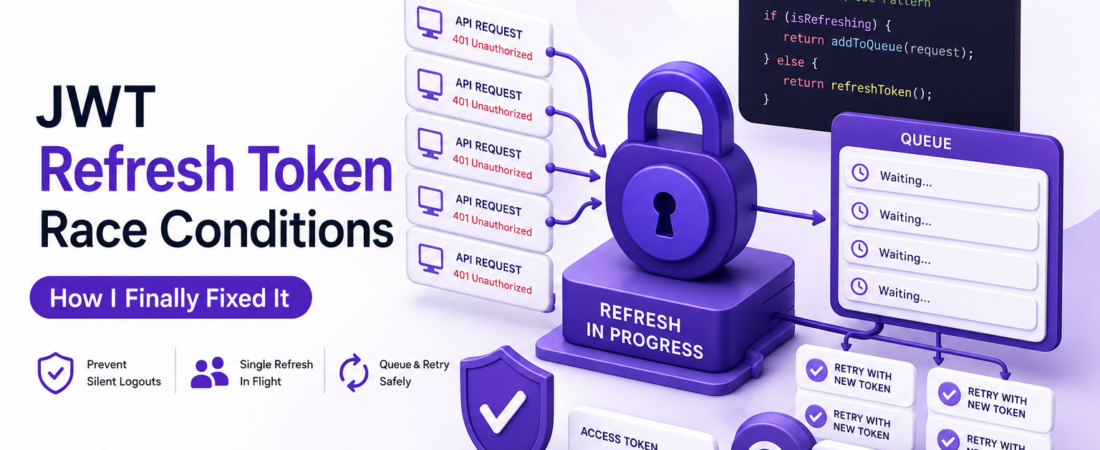
About two years ago, I was debugging a strange bug where users would randomly get logged out mid-session on a busy React app. The access token had expired and five API calls fired at the same moment. Each one got a 401 Unauthorized, each one tried to call /auth/refresh, and — depending on which refresh response arrived first — the others would invalidate the newly issued token by trying to refresh again with a stale refresh token. By the time the dust settled, the user was fully logged out.
This is the JWT refresh token race condition, and it’s one of those bugs that’s nearly invisible in development (where you’re making one request at a time) but brutal in production (where a dashboard loads six endpoints simultaneously). Here’s how I diagnosed it and the exact pattern I now use to prevent it.
TL;DR
- A JWT race condition occurs when multiple parallel API requests all detect a 401 and each independently attempt to refresh the token, invalidating each other.
- The fix is a refresh queue: only one refresh call is allowed in flight at a time; all other failing requests wait for that one refresh to complete, then retry with the new token.
- Implement the queue at your HTTP client interceptor level (Axios or
fetchwrapper) so the fix applies to every API call automatically.
Background — Why This Happens
JSON Web Tokens (JWTs) are signed, self-contained tokens. A typical auth flow issues a short-lived access token (e.g., 15 minutes) and a longer-lived refresh token (e.g., 7 days). When the access token expires, the client is supposed to call a /auth/refresh endpoint with the refresh token to get a new access token.
The problem: most refresh token implementations (especially with OAuth 2.0 and custom auth servers) operate under refresh token rotation — each time you use a refresh token, it’s invalidated and replaced with a new one. This is a security feature ([SOURCE: https://www.rfc-editor.org/rfc/rfc6749]). But it means that if two requests try to use the same refresh token simultaneously, only one can succeed; the second one will receive an error because the refresh token was already rotated.
On a modern SPA or React Native app, it’s entirely normal to have 5–10 API calls fire when a page loads. If the access token expires while the app is idle and then the user navigates to a data-heavy page, all of those calls will hit the server with an expired token at the same time.
Secondary keywords used in this article: token rotation OAuth 2.0, Axios interceptor JWT refresh, refresh token queue JavaScript, handling 401 unauthorized React, access token expiration handling.
[INTERNAL LINK: related article on securing APIs with JWT in Node.js]
Prerequisites
- A JavaScript or TypeScript frontend (React, Vue, React Native — the pattern is framework-agnostic)
- Axios installed, or a custom
fetchwrapper you control - A backend
/auth/refreshendpoint that accepts a refresh token and returns a new access token (and ideally a new refresh token) - Basic understanding of Promises and
async/await
Step-by-Step: Building the Refresh Token Queue
Step 1 — Understand What You’re Building
The solution is a mutex-like pattern for token refresh:
- The first request that gets a 401 starts the refresh process and stores the in-flight refresh Promise.
- Every subsequent 401 that arrives while a refresh is already in progress does not call
/auth/refreshagain — it waits on the same stored Promise. - When the refresh resolves, all waiting requests retry with the new access token.
- If the refresh fails, all waiting requests reject.
This guarantees that /auth/refresh is called at most once per expiration cycle.
Step 2 — Set Up Your Axios Instance
Create a dedicated Axios instance rather than using the global axios object. This makes it easy to attach interceptors cleanly and to pass configuration in one place.
// lib/apiClient.js
import axios from 'axios';

const apiClient = axios.create({
  baseURL: process.env.NEXT_PUBLIC_API_URL,
  headers: {
    'Content-Type': 'application/json',
  },
});

export default apiClient;
Step 3 — Write the Token Refresh Logic with a Queue
// lib/apiClient.js
import axios from 'axios';

const apiClient = axios.create({
  baseURL: process.env.NEXT_PUBLIC_API_URL,
});

let isRefreshing = false;
let failedRequestQueue = [];

function processQueue(error, token = null) {
  failedRequestQueue.forEach((request) => {
    if (error) {
      request.reject(error);
    } else {
      request.resolve(token);
    }
  });
  failedRequestQueue = [];
}

apiClient.interceptors.request.use((config) => {
  const token = localStorage.getItem('accessToken');
  if (token) {
    config.headers['Authorization'] = `Bearer ${token}`;
  }
  return config;
});

apiClient.interceptors.response.use(
  (response) => response,
  async (error) => {
    const originalRequest = error.config;

    // Only handle 401 errors, and only once per request (_retry flag)
    if (error.response?.status !== 401 || originalRequest._retry) {
      return Promise.reject(error);
    }

    if (isRefreshing) {
      // A refresh is already in progress — queue this request
      return new Promise((resolve, reject) => {
        failedRequestQueue.push({ resolve, reject });
      })
        .then((newToken) => {
          originalRequest.headers['Authorization'] = `Bearer ${newToken}`;
          return apiClient(originalRequest);
        })
        .catch((err) => Promise.reject(err));
    }

    // No refresh in progress — this request will do it
    originalRequest._retry = true;
    isRefreshing = true;

    const refreshToken = localStorage.getItem('refreshToken');

    try {
      const { data } = await axios.post('/auth/refresh', { refreshToken });

      const newAccessToken = data.accessToken;
      localStorage.setItem('accessToken', newAccessToken);

      // If the server rotates refresh tokens, store the new one too
      if (data.refreshToken) {
        localStorage.setItem('refreshToken', data.refreshToken);
      }

      apiClient.defaults.headers.common['Authorization'] = `Bearer ${newAccessToken}`;

      processQueue(null, newAccessToken);

      originalRequest.headers['Authorization'] = `Bearer ${newAccessToken}`;
      return apiClient(originalRequest);
    } catch (refreshError) {
      processQueue(refreshError, null);

      // Refresh failed — clear tokens and redirect to login
      localStorage.removeItem('accessToken');
      localStorage.removeItem('refreshToken');
      window.location.href = '/login';

      return Promise.reject(refreshError);
    } finally {
      isRefreshing = false;
    }
  }
);

export default apiClient;
The _retry flag on originalRequest is critical. Without it, if the retried request also gets a 401 (which shouldn’t happen but can if the server has a bug), the interceptor will try to refresh again infinitely.
Step 4 — Handle the Case Where the Refresh Token Is Also Expired
When the refresh token itself expires, /auth/refresh will return a 4xx response. The catch block in the code above handles this: it clears all stored tokens and redirects to /login. Make sure your redirect logic works in your framework — in Next.js App Router, use router.push('/login') from a context, or window.location.href = '/login' as a fallback.
Security Note: Never store tokens in
localStorageif your app renders untrusted HTML or has any XSS vulnerability. For higher-security applications, store access tokens in memory (a React context or Zustand store) and refresh tokens inHttpOnlycookies. The/auth/refreshcall would then go cookie-to-cookie with no JavaScript involvement, completely eliminating the token theft surface.
Step 5 — Test the Race Condition Explicitly
In development, simulate the race condition before shipping. Here’s how I do it:
- Log in and get a valid session.
- Manually expire the access token by either setting a very short expiry on the server (e.g., 5 seconds), or by deleting and replacing the stored token with a known-expired JWT.
- Trigger multiple simultaneous API calls. In a React app, navigate to a page that fires several
useEffectdata fetches at once. - Open the Network tab in DevTools and verify that only one request goes to
/auth/refresh, and all the others are queued and then replayed with the new token.
If you see multiple calls to /auth/refresh, your queue isn’t working correctly.
[SOURCE: https://www.rfc-editor.org/rfc/rfc6749#section-10.4]
Real-World Tips I Use in Production
Proactive token refresh. Instead of waiting for a 401, check the JWT exp claim before making a request. Since JWTs are base64-encoded, you can decode the payload without a library:
function getTokenExpiry(token) {
  try {
    const payload = JSON.parse(atob(token.split('.')[1]));
    return payload.exp * 1000; // exp is in seconds, Date uses ms
  } catch {
    return null;
  }
}

function isTokenExpiringSoon(token, bufferMs = 30000) {
  const expiry = getTokenExpiry(token);
  if (!expiry) return true;
  return Date.now() > expiry - bufferMs; // refresh 30 seconds early
}
If the token is expiring in less than 30 seconds, refresh it proactively before sending the request. This eliminates the race condition entirely for most normal usage, because you’re refreshing before the token is actually expired and before multiple parallel requests have a chance to all hit a 401 at the same moment.
Use a single source of truth for the token. In my production apps I store the access token in a React context (in memory), not in localStorage. The interceptor reads from context. This means the token is never accessible to third-party scripts running in the page, and it’s automatically cleared on page reload — which is often the desired behavior for access tokens.
Log refresh events. Send a structured log event every time a token refresh happens (success or failure). In production, I’ve used these logs to detect refresh token theft (an unusual number of refresh failures from the same user but different IPs) and to tune token expiry windows.
Common Errors and How I Fixed Them
Problem: Refresh call fires successfully but the retried requests still get 401. Root cause: I was setting the new token on apiClient.defaults.headers.common but not on originalRequest.headers. The retried request used its originally-captured config, not the updated defaults. Fix: explicitly set originalRequest.headers['Authorization'] before returning apiClient(originalRequest).
Problem: After a successful refresh, the same user gets logged out again 15 minutes later. Root cause: I was storing the new access token but not the new refresh token when the server used rotation. On the next expiry cycle, the client sent a stale refresh token and was rejected. Fix: always check the refresh response for a new refreshToken field and store it if present.
Problem: In React Native, window.location.href doesn’t work for redirecting to the login screen. Root cause: React Native has no window.location. Fix: use a navigation ref — create a navigationRef with React.createRef(), pass it to NavigationContainer, and call navigationRef.current.navigate('Login') inside the interceptor’s catch block.
FAQ — JWT Refresh Token Race Conditions
Q: How do I prevent JWT refresh token race conditions in a React application? A: Use a single in-flight refresh Promise with a failed-request queue. The first 401 triggers a refresh; all subsequent 401s while the refresh is in progress are added to a queue. When the refresh completes, all queued requests are replayed with the new token. Implement this pattern in an Axios response interceptor so it applies to every API call automatically.
Q: Is it safe to store JWT refresh tokens in localStorage? A: It’s a trade-off. localStorage is accessible to any JavaScript running on your page, which makes it vulnerable to XSS attacks. For applications that handle sensitive data, store refresh tokens in HttpOnly cookies (inaccessible to JavaScript) and access tokens in memory. For lower-risk apps where you’ve mitigated XSS through a strict Content Security Policy, localStorage is common and pragmatic.
Q: What is refresh token rotation and why does it make race conditions worse? A: Refresh token rotation means each time you use a refresh token, the server invalidates it and issues a new one. This is a security best practice because a stolen refresh token can only be used once before it’s invalidated. However, it makes race conditions worse because if two requests use the same refresh token simultaneously, only the first one succeeds; the second fails because the token was already rotated.
Q: How do I test JWT refresh token race conditions locally? A: Set the access token expiry to a very short duration (5–10 seconds) on your development server. Then navigate to a page that fires multiple data fetches simultaneously. Check the Network tab to confirm only one call goes to /auth/refresh. Alternatively, replace the stored access token with an expired JWT (you can construct one manually with a past exp claim) right before navigating to a data-heavy page.
Q: What should happen when the refresh token itself expires? A: The /auth/refresh endpoint should return a 4xx error. Your interceptor’s catch block should clear all stored tokens, reject all queued requests, and redirect the user to the login page. This is the correct UX — the session is genuinely over, and requiring the user to log in again is the right response.
Conclusion
JWT refresh token race conditions are the kind of bug that makes you feel like you’re fighting the framework, but the solution is surprisingly mechanical once you understand the root cause. A queuing pattern at the interceptor level fixes it globally, across every API call in your app, without any component-level changes.
About the Author
I’m a software engineer with nine years of experience building web and mobile applications, with a strong focus on authentication, API design, and frontend architecture. I’ve worked on fintech and healthcare products where getting auth right wasn’t optional, and those constraints taught me most of what I know about JWT security. My current stack is TypeScript, React, Node.js, and PostgreSQL.