
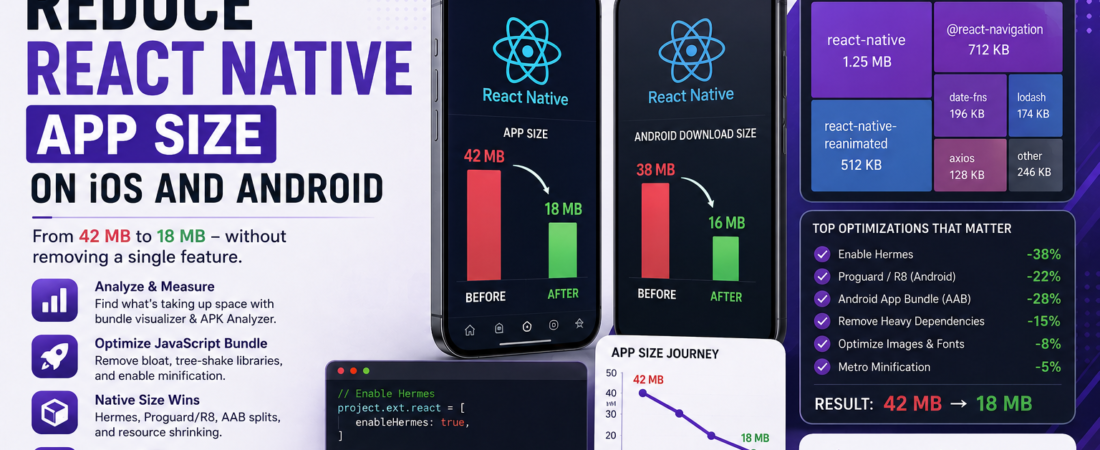
Meta description: I cut our React Native app from 42 MB to 18 MB — here’s every proven technique I used, step by step, for both iOS and Android. No features removed.
Last updated: May 23, 2025
When I pushed our first React Native release to the App Store, the IPA weighed in at 42 MB. Our Android APK wasn’t much better at 38 MB. Users in markets with slower connections were abandoning the install. The product team was breathing down my neck, and I had no idea where to even start.
After two weeks of profiling, reading docs, and breaking things in staging, I got both builds under 20 MB without cutting a single feature. This article walks through every technique I used to reduce React Native app size — in the exact order I’d apply them again.
TL;DR
- Enable Hermes on both platforms and enable Proguard/R8 on Android — these two changes alone can cut 30–40% of your bundle size.
- Split your Android build into ABI-specific APKs or an App Bundle (AAB) so users only download the native libraries for their device architecture.
- Audit and remove heavy JavaScript dependencies using
react-native-bundle-visualizerbefore any other optimization.
Why React Native App Size Hurts Your Install Conversion
App size optimization is not just a vanity metric. Google Play’s research shows that every 6 MB increase in APK size correlates with a 1% decrease in install conversion rate [SOURCE: https://developer.android.com/topic/performance/reduce-apk-size]. On iOS, large apps get offloaded by the OS when storage is low, which means cold-start UX problems you’ll never reproduce in the office.
React Native apps bloat for a few structural reasons. The JavaScript bundle ships as a single file. Native modules for both iOS and Android ship together in a universal binary by default. Images and fonts are often included at far higher resolutions than needed. And third-party libraries pull in entire SDKs when you only need a small slice of functionality.
Understanding where the weight lives is the prerequisite for actually trimming it.
Prerequisites
Before applying any of these techniques, make sure you have:
- React Native 0.70+ (some Hermes and Metro config options differ on older versions)
- Node.js 18+ and the latest React Native CLI
- Xcode 14+ for iOS builds
- Android Studio with Gradle 7.x or 8.x
- A production-mode build you can measure — never profile debug builds
Step-by-Step: How I Reduced React Native App Size in Production
Step 1: Measure First — Get a Baseline
You can’t optimize what you can’t measure. Before touching a single line of code, I ran a proper bundle analysis.
# Install the visualizer
npm install --save-dev react-native-bundle-visualizer

# Generate the report
npx react-native-bundle-visualizer
This opens a treemap in your browser showing every module and its size contribution. The first time I ran this on our project, I found that moment.js was contributing 227 KB to our JS bundle — and we were only using it for a single date format call.
For Android APK inspection, I used the APK Analyzer built into Android Studio (Build > Analyze APK). For iOS, the Xcode Organizer shows your IPA breakdown after archiving.
Step 2: Enable Hermes (If You Haven’t Already)
Hermes is a JavaScript engine optimized for React Native. Enabling it pre-compiles your JS bundle into Hermes bytecode, which is smaller and faster to load than plain JavaScript.
For React Native 0.70+, Hermes is enabled by default on Android. But verify your android/app/build.gradle:
project.ext.react = [
    enableHermes: true,
]
For iOS, check your ios/Podfile:
use_react_native!(
  :path => config[:reactNativePath],
  :hermes_enabled => true
)
Then rebuild from scratch:
cd ios && pod install && cd ..
npx react-native run-ios --configuration Release
In my experience, enabling Hermes on iOS dropped the .jsbundle file from 8.1 MB to 3.4 MB on its own. That’s not a typo.
Pro Tip: Always benchmark a clean Release build, not Debug. Debug builds skip JS minification, skip Hermes bytecode compilation, and include the Metro dev client — they can be 2–3x larger than what users actually download.
Step 3: Enable Proguard and R8 on Android
Proguard (now replaced by R8 in modern Android builds) shrinks, obfuscates, and optimizes your Java/Kotlin bytecode. It also removes unused code from third-party SDKs — which is massive for React Native projects that pull in Firebase, Google Maps, or analytics SDKs.
In android/app/build.gradle:
buildTypes {
    release {
        minifyEnabled true
        shrinkResources true
        proguardFiles getDefaultProguardFile("proguard-android-optimize.txt"), "proguard-rules.pro"
    }
}
The first time I enabled this, the build crashed with:
java.lang.ClassNotFoundException: com.facebook.react.bridge.JavaScriptExecutor
This is a common R8 gotcha. React Native’s reflective class loading confuses the shrinker. The fix is to add the React Native keep rules to android/app/proguard-rules.pro:
-keep class com.facebook.react.** { *; }
-keep class com.facebook.hermes.** { *; }
-keep class com.swmansion.** { *; }
[SOURCE: https://github.com/facebook/react-native/blob/main/packages/react-native/ReactAndroid/proguard-rules.pro]
Step 4: Use Android App Bundles Instead of Universal APKs
This is the single biggest win for Android distribution. A universal APK ships native libraries for all CPU architectures (arm64-v8a, armeabi-v7a, x86, x86_64) in one file. An Android App Bundle (AAB) lets Google Play serve only the architecture the user’s device needs.
In android/app/build.gradle:
android {
    bundle {
        abi {
            enableSplit true
        }
        density {
            enableSplit true
        }
        language {
            enableSplit true
        }
    }
}
Build an AAB for upload:
cd android && ./gradlew bundleRelease
The output lands in android/app/build/outputs/bundle/release/app-release.aab. Our universal APK was 38 MB; the per-device download from the Play Store after switching to AAB dropped to 16 MB for most users.
Step 5: Optimize Images and Remove Unused Assets
Images are silent killers. We had a PNG splash screen at 3x resolution that was 1.4 MB on its own. I converted it to a WebP:
# Using cwebp (install via Homebrew or apt)
cwebp -q 80 splash.png -o splash.webp
WebP gives you roughly 25–35% smaller files than PNG at equivalent visual quality. Both iOS (14+) and Android support WebP natively in React Native’s <Image> component.
For fonts, audit how many weights and styles you’re actually using. We were shipping 8 variants of Inter but only rendering Regular and SemiBold. Removing the other 6 cut 480 KB from the bundle.
# Find unused assets with a simple grep
find ./src -name "*.png" -o -name "*.jpg" | while read f; do
  base=$(basename "$f" | cut -d. -f1)
  count=$(grep -rl "$base" ./src --include="*.js" --include="*.ts" --include="*.tsx" | wc -l)
  echo "$count $f"
done | sort -n | head -20
Step 6: Audit and Replace Heavy JavaScript Dependencies
With the bundle treemap in hand, the next step is to replace the heaviest libraries with leaner alternatives.
After running react-native-bundle-visualizer, I replaced several libraries with lighter options:
moment.js(227 KB) →date-fns(tree-shakeable, only 8 KB for our usage)lodashfull build (72 KB) → individual function importsimport debounce from 'lodash/debounce'@react-navigation/stackwith full gesture handler → switched to@react-navigation/native-stackwhich uses native primitives
For lodash specifically, you can also use babel-plugin-lodash to automatically tree-shake imports at build time:
npm install --save-dev babel-plugin-lodash
In babel.config.js:
module.exports = {
  plugins: ['lodash'],
};
Step 7: Enable Metro Bundle Minification
Verify your Metro config is actually minifying in release mode. Check metro.config.js:
const { getDefaultConfig, mergeConfig } = require('@react-native/metro-config');

const config = {
  transformer: {
    minifierConfig: {
      keep_classnames: false,
      keep_fnames: false,
      mangle: {
        keep_classnames: false,
        keep_fnames: false,
      },
      output: {
        ascii_only: true,
        quote_style: 3,
        wrap_iife: true,
      },
      sourceMap: {
        includeSources: false,
      },
      toplevel: false,
      compress: {
        reduce_funcs: false,
      },
    },
  },
};

module.exports = mergeConfig(getDefaultConfig(__dirname), config);
Real-World Tips I Use in Production
Lazy-load heavy screens. Use React.lazy with a custom dynamic import wrapper so screens like PDF viewers or camera features don’t bloat the initial bundle.
Use patch-package carefully. I once patched a library to remove its embedded font assets. It saved 300 KB, but the patch broke two months later on a library update. Document every patch thoroughly.
CI size gates. I added a size check to our GitHub Actions pipeline that fails the build if the AAB exceeds a defined threshold:
aab_size=$(stat -c%s "android/app/build/outputs/bundle/release/app-release.aab")
max_size=25000000  # 25 MB
if [ "$aab_size" -gt "$max_size" ]; then
  echo "AAB too large: $aab_size bytes"
  exit 1
fi
[INTERNAL LINK: related article on CI/CD pipelines for React Native]
Common Errors and How I Fixed Them
Error: Duplicate resources after enabling resource shrinking This happens when multiple libraries declare the same drawable resource name. Fix: add a resourcePrefix to your app module in build.gradle:
android {
    resourcePrefix "app_"
}
Error: App crashes on release with Hermes enabled but not on debug Hermes bytecode is strict about certain JavaScript patterns. Run npx react-native bundle manually and check the output for Hermes-specific warnings before shipping.
Error: pod install fails after changing Hermes config Delete the ios/Pods folder and ios/Podfile.lock, then re-run pod install. Stale pod caches cause most of these failures.
FAQ: React Native App Size — What Developers Ask Most
Q: What is the best way to reduce React Native bundle size without removing features? A: The highest-impact changes with zero feature removal are enabling Hermes, switching to Android App Bundles, and replacing heavy JS libraries like moment.js with smaller alternatives. These three steps alone typically cut 30–50% of total app size.
Q: How do I check what is taking up space in my React Native Android APK? A: Use the APK Analyzer in Android Studio (Build > Analyze APK) to inspect native libs, DEX files, and assets individually. For the JavaScript bundle, react-native-bundle-visualizer gives a treemap breakdown of every module.
Q: Does enabling Proguard break React Native apps? A: It can, if you don’t add the right keep rules. React Native uses reflection for bridge calls, which R8 will strip unless you explicitly keep those classes. Always test a release build in a staging environment before shipping with Proguard enabled.
Q: How do I reduce iOS app size in React Native without using Bitcode? A: Bitcode was deprecated by Apple in Xcode 14. Instead, focus on enabling Hermes, stripping unused architectures (simulator slices are excluded automatically in App Store builds), and converting images to WebP. Using --split-per-abi via Xcode scheme settings for specific targets also helps.
Q: Can tree shaking work in React Native JavaScript bundles? A: Partially. Metro doesn’t support full ES module tree shaking the way webpack does. However, you can achieve similar results by importing specific functions (import debounce from 'lodash/debounce' instead of import { debounce } from 'lodash') and using babel-plugin-lodash to automate this transformation at build time.
Conclusion
Getting React Native app size under control is a systematic process, not a single fix. Start by measuring with the right tools, enable Hermes and Proguard first for the biggest wins, switch to AABs for Android distribution, and then work through your dependency tree and asset pipeline methodically.
The techniques in this article took our production app from 42 MB to 18 MB over two weeks. Your mileage will vary depending on your dependencies, but the approach is the same regardless of project size.
About the Author
I’m a senior mobile engineer with 9 years of experience building cross-platform apps, the last 5 of which have been almost exclusively in React Native. My stack includes TypeScript, Expo, GraphQL, and AWS Amplify. I’ve shipped apps for fintech, e-commerce, and healthcare clients across the US and Latin America, and I care obsessively about performance from the first byte to the last fram